<?xml version="1.0" encoding="UTF-8"?>
<feed xmlns="http://www.w3.org/2005/Atom" xml:lang="en-gb">
<link rel="self" type="application/atom+xml" href="http://www.inkscapeforum.com/feed.php?mode=topics_active" />

<title>InkscapeForum.com</title>
<subtitle>An Inkscape users' forum</subtitle>
<link href="http://www.inkscapeforum.com/index.php" />
<updated>2019-12-07T02:24:00+10:00</updated>

<author><name><![CDATA[InkscapeForum.com]]></name></author>
<id>http://www.inkscapeforum.com/feed.php?mode=topics_active</id>
<entry>
<author><name><![CDATA[Moini]]></name></author>
<updated>2019-12-07T02:24:00+10:00</updated>
<published>2019-12-07T02:24:00+10:00</published>
<id>http://www.inkscapeforum.com/viewtopic.php?t=35636&amp;p=111396#p111396</id>
<link href="http://www.inkscapeforum.com/viewtopic.php?t=35636&amp;p=111396#p111396"/>
<title type="html"><![CDATA[Help with using Inkscape • svg file is blank upon opening]]></title>

<category term="Help with using Inkscape" scheme="http://www.inkscapeforum.com/viewforum.php?f=5" label="Help with using Inkscape"/>
<content type="html" xml:base="http://www.inkscapeforum.com/viewtopic.php?t=35636&amp;p=111396#p111396"><![CDATA[
Yes, probably. Unless you accidentally converted all contents of your drawing to patterns. You can do Object &gt; Pattern &gt; Pattern to objects on a patterned object to convert it back, if that's the case.<p>Statistics: Posted by <a href="http://www.inkscapeforum.com/memberlist.php?mode=viewprofile&amp;u=25208">Moini</a> — Sat Dec 07, 2019 2:24 am — Replies 7 — Views 150</p><hr />
]]></content>
</entry>
<entry>
<author><name><![CDATA[Moini]]></name></author>
<updated>2019-12-06T05:32:03+10:00</updated>
<published>2019-12-06T05:32:03+10:00</published>
<id>http://www.inkscapeforum.com/viewtopic.php?t=35651&amp;p=111387#p111387</id>
<link href="http://www.inkscapeforum.com/viewtopic.php?t=35651&amp;p=111387#p111387"/>
<title type="html"><![CDATA[Help with using Inkscape • Copying Text Put on Path (moving text relative to a line)]]></title>

<category term="Help with using Inkscape" scheme="http://www.inkscapeforum.com/viewforum.php?f=5" label="Help with using Inkscape"/>
<content type="html" xml:base="http://www.inkscapeforum.com/viewtopic.php?t=35651&amp;p=111387#p111387"><![CDATA[
Sorry, it's not clear to me what you want yet.<br /><br />So, what I understand is:<br /><br />You want to have a text that follows a path, and is centered on that.<br />Text &gt; Put on path works for you.<br /><br />It seems you want to have the same text linked to a different line, is that correct?<br /><br />If that is the case, then:<br /><br />- Ctrl+C the text<br />- Paste it<br />- Text &gt; remove from path<br />- Text &gt; put on path with the other path<br /><br />or: <br /><br />Make a copy of the text before you put it on the path and put only the copies on different paths.<br /><br />or: <br /><br />Edit the text attributes to point to the id of the new path in the XML editor.<br /><br />It doesn't look as if anyone has created a feature yet to link the text to a different path, when the path is copied along with the text.<br />You can make a feature request for that at <!-- m --><a class="postlink" href="https://inkscape.org/report">https://inkscape.org/report</a><!-- m --> .<p>Statistics: Posted by <a href="http://www.inkscapeforum.com/memberlist.php?mode=viewprofile&amp;u=25208">Moini</a> — Fri Dec 06, 2019 5:32 am — Replies 1 — Views 35</p><hr />
]]></content>
</entry>
<entry>
<author><name><![CDATA[Moini]]></name></author>
<updated>2019-12-06T05:22:25+10:00</updated>
<published>2019-12-06T05:22:25+10:00</published>
<id>http://www.inkscapeforum.com/viewtopic.php?t=35655&amp;p=111386#p111386</id>
<link href="http://www.inkscapeforum.com/viewtopic.php?t=35655&amp;p=111386#p111386"/>
<title type="html"><![CDATA[Help with using Inkscape • It is not possible to import the Jpeg-pictures in inkscape 9.2.4]]></title>

<category term="Help with using Inkscape" scheme="http://www.inkscapeforum.com/viewforum.php?f=5" label="Help with using Inkscape"/>
<content type="html" xml:base="http://www.inkscapeforum.com/viewtopic.php?t=35655&amp;p=111386#p111386"><![CDATA[
There's a known issue, maybe that is yours, too: <br /><!-- m --><a class="postlink" href="https://inkscape.org/forums/questions/linked-image-not-found-when-importing-images-in-inkscape/#c2837">https://inkscape.org/forums/questions/l ... ape/#c2837</a><!-- m --><p>Statistics: Posted by <a href="http://www.inkscapeforum.com/memberlist.php?mode=viewprofile&amp;u=25208">Moini</a> — Fri Dec 06, 2019 5:22 am — Replies 1 — Views 35</p><hr />
]]></content>
</entry>
<entry>
<author><name><![CDATA[Moini]]></name></author>
<updated>2019-12-06T05:08:51+10:00</updated>
<published>2019-12-06T05:08:51+10:00</published>
<id>http://www.inkscapeforum.com/viewtopic.php?t=35639&amp;p=111384#p111384</id>
<link href="http://www.inkscapeforum.com/viewtopic.php?t=35639&amp;p=111384#p111384"/>
<title type="html"><![CDATA[Help with using Inkscape • open .eps file in Inkscape]]></title>

<category term="Help with using Inkscape" scheme="http://www.inkscapeforum.com/viewforum.php?f=5" label="Help with using Inkscape"/>
<content type="html" xml:base="http://www.inkscapeforum.com/viewtopic.php?t=35639&amp;p=111384#p111384"><![CDATA[
Ghostscript instructions are also available in the FAQ, maybe those are detailed enough? See <!-- m --><a class="postlink" href="https://inkscape.org/learn/faq/#how-open-eps-files-windows">https://inkscape.org/learn/faq/#how-ope ... es-windows</a><!-- m --> .<p>Statistics: Posted by <a href="http://www.inkscapeforum.com/memberlist.php?mode=viewprofile&amp;u=25208">Moini</a> — Fri Dec 06, 2019 5:08 am — Replies 5 — Views 112</p><hr />
]]></content>
</entry>
<entry>
<author><name><![CDATA[Moini]]></name></author>
<updated>2019-12-06T05:05:34+10:00</updated>
<published>2019-12-06T05:05:34+10:00</published>
<id>http://www.inkscapeforum.com/viewtopic.php?t=4918&amp;p=111383#p111383</id>
<link href="http://www.inkscapeforum.com/viewtopic.php?t=4918&amp;p=111383#p111383"/>
<title type="html"><![CDATA[General Discussions • How to draw line]]></title>

<category term="General Discussions" scheme="http://www.inkscapeforum.com/viewforum.php?f=22" label="General Discussions"/>
<content type="html" xml:base="http://www.inkscapeforum.com/viewtopic.php?t=4918&amp;p=111383#p111383"><![CDATA[
<img class="smilies" src="http://www.inkscapeforum.com/images/smilies/icon_e_smile.gif" alt=":)" title="Smile" /> It's the Pen tool. <br /><br />Maybe it would be enough to rename the 'Advanced' tutorial in the 'Help' menu ... It contains the info you're looking for.<br /><br />I think you might also like to have a look at a beginner-friendly manual, like <!-- m --><a class="postlink" href="https://inkscape-manuals.readthedocs.io/en/latest/index.html">https://inkscape-manuals.readthedocs.io ... index.html</a><!-- m --> or a tutorial series like this series: <!-- l --><a class="postlink-local" href="http://www.inkscapeforum.com/viewtopic.php?f=6&amp;t=11981">viewtopic.php?f=6&amp;t=11981</a><!-- l --> .<p>Statistics: Posted by <a href="http://www.inkscapeforum.com/memberlist.php?mode=viewprofile&amp;u=25208">Moini</a> — Fri Dec 06, 2019 5:05 am — Replies 62 — Views 113865</p><hr />
]]></content>
</entry>
<entry>
<author><name><![CDATA[Moini]]></name></author>
<updated>2019-12-06T05:00:03+10:00</updated>
<published>2019-12-06T05:00:03+10:00</published>
<id>http://www.inkscapeforum.com/viewtopic.php?t=35645&amp;p=111382#p111382</id>
<link href="http://www.inkscapeforum.com/viewtopic.php?t=35645&amp;p=111382#p111382"/>
<title type="html"><![CDATA[General Discussions • Inkscape v Mac]]></title>

<category term="General Discussions" scheme="http://www.inkscapeforum.com/viewforum.php?f=22" label="General Discussions"/>
<content type="html" xml:base="http://www.inkscapeforum.com/viewtopic.php?t=35645&amp;p=111382#p111382"><![CDATA[
If you don't get a reply here (I think there aren't any macOS experts here on this forum, and I'm not one, either), try the user chat at <!-- m --><a class="postlink" href="https://chat.inkscape.org/channel/inkscape_user">https://chat.inkscape.org/channel/inkscape_user</a><!-- m --> or the forum at <!-- m --><a class="postlink" href="https://inkscape.org/forums">https://inkscape.org/forums</a><!-- m -->.<p>Statistics: Posted by <a href="http://www.inkscapeforum.com/memberlist.php?mode=viewprofile&amp;u=25208">Moini</a> — Fri Dec 06, 2019 5:00 am — Replies 1 — Views 51</p><hr />
]]></content>
</entry>
<entry>
<author><name><![CDATA[Lazur URH]]></name></author>
<updated>2019-12-05T23:51:36+10:00</updated>
<published>2019-12-05T23:51:36+10:00</published>
<id>http://www.inkscapeforum.com/viewtopic.php?t=35658&amp;p=111381#p111381</id>
<link href="http://www.inkscapeforum.com/viewtopic.php?t=35658&amp;p=111381#p111381"/>
<title type="html"><![CDATA[News, Events &amp; Developments • Inkscape 1.0 -beta2 release]]></title>

<category term="News, Events &amp; Developments" scheme="http://www.inkscapeforum.com/viewforum.php?f=21" label="News, Events &amp; Developments"/>
<content type="html" xml:base="http://www.inkscapeforum.com/viewtopic.php?t=35658&amp;p=111381#p111381"><![CDATA[
Inkscape 1.0 beta2 is released to the public for testing.<br />There are more than 100 major and minor improvements and bug fixes since 0.92.4.<br />If you are interested, please also consider helping the developer team with feedback on<br /> • problems with texts in Inkscape files from older Inkscape versions<br /> • unknown crashes<br /> • extensions not doing what they should be doing<br /> • things that worked in 0.92.4, but are no longer working in the beta version.<br /><br /><br /><br />Further info, download links available here:<br /><a href="https://inkscape.org/release/inkscape-1.0/?latest=1&amp;fbclid=IwAR0gduapNBb_niKV3ESLm3FPmHzJtv_QMD4xECq5AcGdrFEVfYK8NYngbqc" class="postlink">beta 2</a><p>Statistics: Posted by <a href="http://www.inkscapeforum.com/memberlist.php?mode=viewprofile&amp;u=18334">Lazur URH</a> — Thu Dec 05, 2019 11:51 pm — Replies 0 — Views 25</p><hr />
]]></content>
</entry>
<entry>
<author><name><![CDATA[druban]]></name></author>
<updated>2019-12-04T14:57:27+10:00</updated>
<published>2019-12-04T14:57:27+10:00</published>
<id>http://www.inkscapeforum.com/viewtopic.php?t=35648&amp;p=111367#p111367</id>
<link href="http://www.inkscapeforum.com/viewtopic.php?t=35648&amp;p=111367#p111367"/>
<title type="html"><![CDATA[Help with using Inkscape • Clip From Path Instead of Object]]></title>

<category term="Help with using Inkscape" scheme="http://www.inkscapeforum.com/viewforum.php?f=5" label="Help with using Inkscape"/>
<content type="html" xml:base="http://www.inkscapeforum.com/viewtopic.php?t=35648&amp;p=111367#p111367"><![CDATA[
To add to what Xav has explained, you might think that 'combine'  from the word would join two paths where they overlap, but it doesn't; that function is performed by the 'join nodes' button in the nodetool control bar. It looks like there might be three locations where the nodes overlap and need to be merged into one.<br />In addition, if, after you have made it into a single path, you want to cut the small shape out of the big one, you will need to use 'difference' or - ironically - 'combine'. I only suggest this because I can see no other reason the larger path should have a specific shape - or even be necessary.<dl class="file"><dt class="attach-image"><img src="http://www.inkscapeforum.com/download/file.php?id=8996" class="postimage" alt="bitmap.png" onclick="viewableArea(this);" /></dt></dl><br /><dl class="file"><dt><span class="imageset icon_topic_attach"></span> <a class="postlink" href="http://www.inkscapeforum.com/download/file.php?id=8995">drawing-1.svg</a></dt></dl><p>Statistics: Posted by <a href="http://www.inkscapeforum.com/memberlist.php?mode=viewprofile&amp;u=3471">druban</a> — Wed Dec 04, 2019 2:57 pm — Replies 2 — Views 64</p><hr />
]]></content>
</entry>
<entry>
<author><name><![CDATA[Moini]]></name></author>
<updated>2019-12-03T03:05:20+10:00</updated>
<published>2019-12-03T03:05:20+10:00</published>
<id>http://www.inkscapeforum.com/viewtopic.php?t=35634&amp;p=111355#p111355</id>
<link href="http://www.inkscapeforum.com/viewtopic.php?t=35634&amp;p=111355#p111355"/>
<title type="html"><![CDATA[Inkscape &amp; Cutters/Plotters • Inkcut with Roland CAMM-1 GS-24 cutting wrong -&gt; Compiling generates random hops to origin?]]></title>

<category term="Inkscape &amp; Cutters/Plotters" scheme="http://www.inkscapeforum.com/viewforum.php?f=31" label="Inkscape &amp; Cutters/Plotters"/>
<content type="html" xml:base="http://www.inkscapeforum.com/viewtopic.php?t=35634&amp;p=111355#p111355"><![CDATA[
Inkcut is a third-party extension, right? Have you asked in the place the author suggests for asking? (whereever you got it from, there may even be multiple sources).<p>Statistics: Posted by <a href="http://www.inkscapeforum.com/memberlist.php?mode=viewprofile&amp;u=25208">Moini</a> — Tue Dec 03, 2019 3:05 am — Replies 2 — Views 104</p><hr />
]]></content>
</entry>
<entry>
<author><name><![CDATA[Moini]]></name></author>
<updated>2019-12-03T03:01:56+10:00</updated>
<published>2019-12-03T03:01:56+10:00</published>
<id>http://www.inkscapeforum.com/viewtopic.php?t=35637&amp;p=111353#p111353</id>
<link href="http://www.inkscapeforum.com/viewtopic.php?t=35637&amp;p=111353#p111353"/>
<title type="html"><![CDATA[Discuss Software Issues • Artwork not saving correctly]]></title>

<category term="Discuss Software Issues" scheme="http://www.inkscapeforum.com/viewforum.php?f=29" label="Discuss Software Issues"/>
<content type="html" xml:base="http://www.inkscapeforum.com/viewtopic.php?t=35637&amp;p=111353#p111353"><![CDATA[
Can you share such a file, please? And also make a screenshot of the 'Save as' or better 'Save a copy' dialog just before you hit the save button?<p>Statistics: Posted by <a href="http://www.inkscapeforum.com/memberlist.php?mode=viewprofile&amp;u=25208">Moini</a> — Tue Dec 03, 2019 3:01 am — Replies 1 — Views 75</p><hr />
]]></content>
</entry>
<entry>
<author><name><![CDATA[Moini]]></name></author>
<updated>2019-12-03T03:00:45+10:00</updated>
<published>2019-12-03T03:00:45+10:00</published>
<id>http://www.inkscapeforum.com/viewtopic.php?t=35641&amp;p=111352#p111352</id>
<link href="http://www.inkscapeforum.com/viewtopic.php?t=35641&amp;p=111352#p111352"/>
<title type="html"><![CDATA[Help with using Inkscape • clipping paths with other paths]]></title>

<category term="Help with using Inkscape" scheme="http://www.inkscapeforum.com/viewforum.php?f=5" label="Help with using Inkscape"/>
<content type="html" xml:base="http://www.inkscapeforum.com/viewtopic.php?t=35641&amp;p=111352#p111352"><![CDATA[
You want to use Boolean operations (and possibly, path editing). Learn about them here: <!-- m --><a class="postlink" href="https://inkscape-manuals.readthedocs.io/en/latest/boolean-operations.html">https://inkscape-manuals.readthedocs.io ... tions.html</a><!-- m --> and here: <!-- m --><a class="postlink" href="https://vektorrascheln.de/posts/2015/Dec/inkscape-fuer-einsteiger-teil-ii-praxis-en.html#boolean-operations">https://vektorrascheln.de/posts/2015/De ... operations</a><!-- m --> for example (many more resources are available on the web).<p>Statistics: Posted by <a href="http://www.inkscapeforum.com/memberlist.php?mode=viewprofile&amp;u=25208">Moini</a> — Tue Dec 03, 2019 3:00 am — Replies 1 — Views 53</p><hr />
]]></content>
</entry>
<entry>
<author><name><![CDATA[Lazur URH]]></name></author>
<updated>2019-12-02T10:48:56+10:00</updated>
<published>2019-12-02T10:48:56+10:00</published>
<id>http://www.inkscapeforum.com/viewtopic.php?t=35640&amp;p=111343#p111343</id>
<link href="http://www.inkscapeforum.com/viewtopic.php?t=35640&amp;p=111343#p111343"/>
<title type="html"><![CDATA[Competitions • Inkscape 1.0 - About screen contest *FINALISTS*]]></title>

<category term="Competitions" scheme="http://www.inkscapeforum.com/viewforum.php?f=24" label="Competitions"/>
<content type="html" xml:base="http://www.inkscapeforum.com/viewtopic.php?t=35640&amp;p=111343#p111343"><![CDATA[
<img src="https://inkscape.org/gallery/item/16172/Top_5_ASC_Inkscape_1.0.png" class="postimage" alt="Image" /><br /><br />The public <a href="http://www.inkscapeforum.com/viewtopic.php?f=24&amp;t=35618" class="postlink">voting period</a> is over.<br />See which entries got into the final round -of which the Inkscape board will decide,<br />the one that will be displayed in the about screen of version 1.0.<br /><br /><br /><br />More details here:<br /><a href="https://inkscape.org/news/2019/12/02/community-chooses-top-5-finalists-version-10-about/" class="postlink">1.0 about screen finalists</a><p>Statistics: Posted by <a href="http://www.inkscapeforum.com/memberlist.php?mode=viewprofile&amp;u=18334">Lazur URH</a> — Mon Dec 02, 2019 10:48 am — Replies 0 — Views 72</p><hr />
]]></content>
</entry>
<entry>
<author><name><![CDATA[Dillerkind]]></name></author>
<updated>2019-12-01T08:29:03+10:00</updated>
<published>2019-12-01T08:29:03+10:00</published>
<id>http://www.inkscapeforum.com/viewtopic.php?t=9424&amp;p=111339#p111339</id>
<link href="http://www.inkscapeforum.com/viewtopic.php?t=9424&amp;p=111339#p111339"/>
<title type="html"><![CDATA[Finished Inkscape Work • Dillerkind's image pool]]></title>

<category term="Finished Inkscape Work" scheme="http://www.inkscapeforum.com/viewforum.php?f=8" label="Finished Inkscape Work"/>
<content type="html" xml:base="http://www.inkscapeforum.com/viewtopic.php?t=9424&amp;p=111339#p111339"><![CDATA[
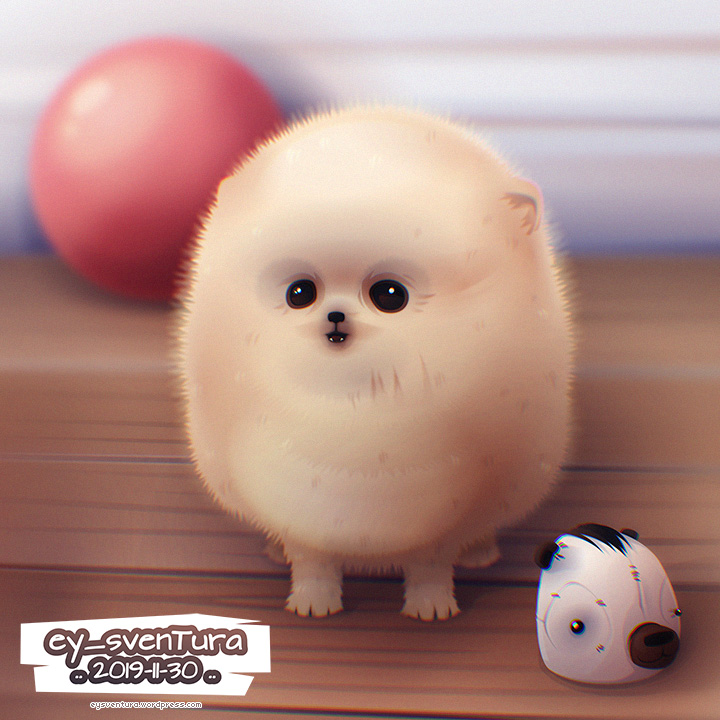
New piece... Felt like trying something fluffy, in case you couldn't tell already :D<br /><br /><a href="https://eysventura.wordpress.com/2019/11/30/fluffball/" class="postlink"><img src="https://eysventura.files.wordpress.com/2019/11/fluffball_vector.jpg" class="postimage" alt="Image" /></a><p>Statistics: Posted by <a href="http://www.inkscapeforum.com/memberlist.php?mode=viewprofile&amp;u=12410">Dillerkind</a> — Sun Dec 01, 2019 8:29 am — Replies 508 — Views 301211</p><hr />
]]></content>
</entry>
</feed>