 This is a read-only archive of the inkscapeforum.com site. You can search for info here or post new questions and comments at
 I need some text in which the glyphs are composed only of convex polygons. Is there an automatic way to do this?
Some overlap is OK.
I thought of finding a font in which the glyph strokes are composed of simple strokes rather than filled paths, and then breaking the path segments out into individual objects which I can thicken to rectangles. But I find no such font and find no command to break a path into segment objects.
Thanks.
How to create text composed of convex polygons?

Re: How to create text composed of convex polygons?
Hi.
Have a look at this; http://www.evilmadscientist.com/2011/hershey-text-an-inkscape-extension-for-engraving-fonts/
RGDS
Ragnar
Have a look at this; http://www.evilmadscientist.com/2011/hershey-text-an-inkscape-extension-for-engraving-fonts/
RGDS
Ragnar
Good Luck!
( ͡° ͜ʖ ͡°)
RGDS
Ragnar
( ͡° ͜ʖ ͡°)
RGDS
Ragnar
Re: How to create text composed of convex polygons?
Thanks Ragnar. That gets me half way:

No, all I need is a way to break these path segments into separate objects. Any ideas?
No, all I need is a way to break these path segments into separate objects. Any ideas?
Re: How to create text composed of convex polygons?
I don't know any other way than manually doing this, BUT be aware that if you make rectangles from each line segments exactly as they are drawn now, then you will be facing overlapping problems in every corners of the paths.
Like on the "e"'s right corner, you will have a "hole", or else, all the rounded parts would have some "spikes".
Like on the "e"'s right corner, you will have a "hole", or else, all the rounded parts would have some "spikes".
Re: How to create text composed of convex polygons?
Lazur URH wrote:you will be facing overlapping problems in every corners of the paths.
No problem. Hence my "Some overlap is OK".
Re: How to create text composed of convex polygons?
Here is attached what I was thinking when saw that "e".
- Attachments
-
- hlp7.zip
- (2.71 KiB) Downloaded 167 times
Re: How to create text composed of convex polygons?
Thanks. How was the last one created?
Re: How to create text composed of convex polygons?
Made the path's curves straight, than duplicated it, then disconnected every second points, then did the same thing with the other path, but with different order.
Path's style was set in the Shift+Ctrl+F panel.
If you want to make them separate objects, then press Ctrl+Shift+K.
Path's style was set in the Shift+Ctrl+F panel.
If you want to make them separate objects, then press Ctrl+Shift+K.
Re: How to create text composed of convex polygons?
Lazur URH wrote:disconnected every second points
Manually i.e. one by one?
Re: How to create text composed of convex polygons?
Yes, that's just the only way I know.
Re: How to create text composed of convex polygons?
chrisjj wrote:Manually i.e. one by one?
Ah, solved that.
So we have:
Click Extensions, Render Hershey Text, Apply, Close
Click text
Click Object, Ungroup
Click "Edit paths by nodes"
Click Select All
Click "Break paths at selected nodes"
Click Stroke Style, Cap: Square Cap.
Click "Path, Break Apart" (drops selection!)
Select all text objects
Click Path, Stroke to Path
Result:

Excellent. Thanks all!

Re: How to create text composed of convex polygons?
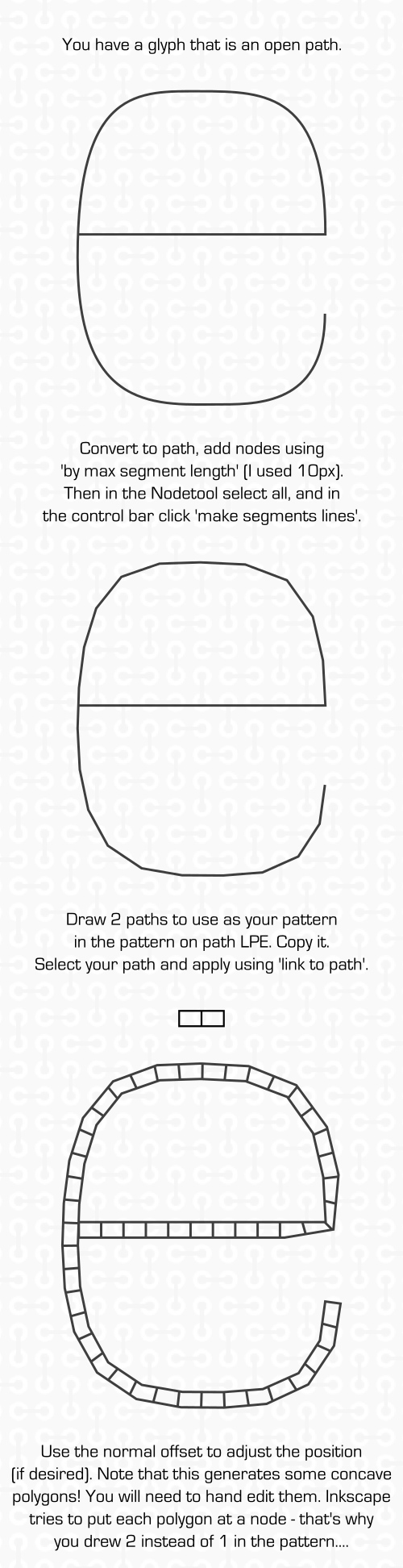
Try this:
Note: the two paths for the pattern are actually combined into one.
- rect3356.jpg (255.43 KiB) Viewed 2663 times
Note: the two paths for the pattern are actually combined into one.
Your mind is what you think it is.
Re: How to create text composed of convex polygons?
Thanks Druban. I can see that might suit someone who can accept an occasional concave polygon slipping through. I'll stick with the rougher convex-only method since my CAM is very concave averse, and I have no tool to pre-verify that there are no convexs in the file.