 This is a read-only archive of the inkscapeforum.com site. You can search for info here or post new questions and comments at
 Hello!
I have always worked with 3D studios, but recently, i've decided to jump right into inkscape and learn some more graphics.
For my current project i am using inkscape for all of the graphics.
I'm not too impressed with my current inkscape ability.
Practice makes prefect though!
I am in need of some help with 2 problems.
1. I have drawn a line to use as a shaded border to an object. There is a grey background, and a blue object behind it. The problem is that i need the Line to be Behind the grey background, and on top of the blue... But this is impossible because the grey has to be behind the blue...
Here is an image... i honestly couldn't think of a better way to explain that problem...
http://imgur.com/C8QKbCu,zrLnj0P#1
2. I am getting some strange artifacts around each object. I used a duplicate object and applied a Turbulance filter to it, set it to around 50% transparency, and that gives and nice randomness to the metals. But! This is causing some trouble by creating unwanted squares around my objects.
Here is an image, you cannot miss the squares i am talking about.
http://imgur.com/C8QKbCu,zrLnj0P#0
I am up for all suggestions on this robot image... Being new to inkscape i'm rather overwhelmed... I'm having a much harder time getting into this than i did 3D studio.
Thanks for any and all help fellas! It is very much appreciated!
My first Conundrum... Is probably an easy fix...
-
TheJanitor
- Posts: 2
- Joined: Sat Feb 22, 2014 12:00 pm
Re: My first Conundrum... Is probably an easy fix...
Welcome aboard!
There are more ways to overcome the first problem.
I would suggest you to use somekind of clipping.
The second one has to do with the filter philosophy being used. It is based on the bounding box, and, to avoid those edges, the easiest way would be to make an object with a larger bounding box.
One way of doing it would be to draw a larger transparent rectangle, put it inside a group with the object, then use the filter on the group.
Also you can clip the filtered objects to have the right shapes too, as that filter makes the objects larger.
It's lot less complex than 3D, you will get used to it in no time.
There are more ways to overcome the first problem.
I would suggest you to use somekind of clipping.
The second one has to do with the filter philosophy being used. It is based on the bounding box, and, to avoid those edges, the easiest way would be to make an object with a larger bounding box.
One way of doing it would be to draw a larger transparent rectangle, put it inside a group with the object, then use the filter on the group.
Also you can clip the filtered objects to have the right shapes too, as that filter makes the objects larger.
It's lot less complex than 3D, you will get used to it in no time.
Last edited by Lazur URH on Thu Feb 27, 2014 8:27 pm, edited 1 time in total.

Re: My first Conundrum... Is probably an easy fix...
The fact that you specifically mentioned a Turbulence filter suggests that you're using the filter editor to add it, rather than picking one of the predefined filters. If that's the case you can fix the problem by adding a "Composite" filter at the end of the chain. Set the Operator parameter to "In" and drag the second input triangle to the "Source Graphic" column. That has the effect of only drawing the bits of the filter that are "In" the source graphic - i.e. it clips it.
- Attachments
-
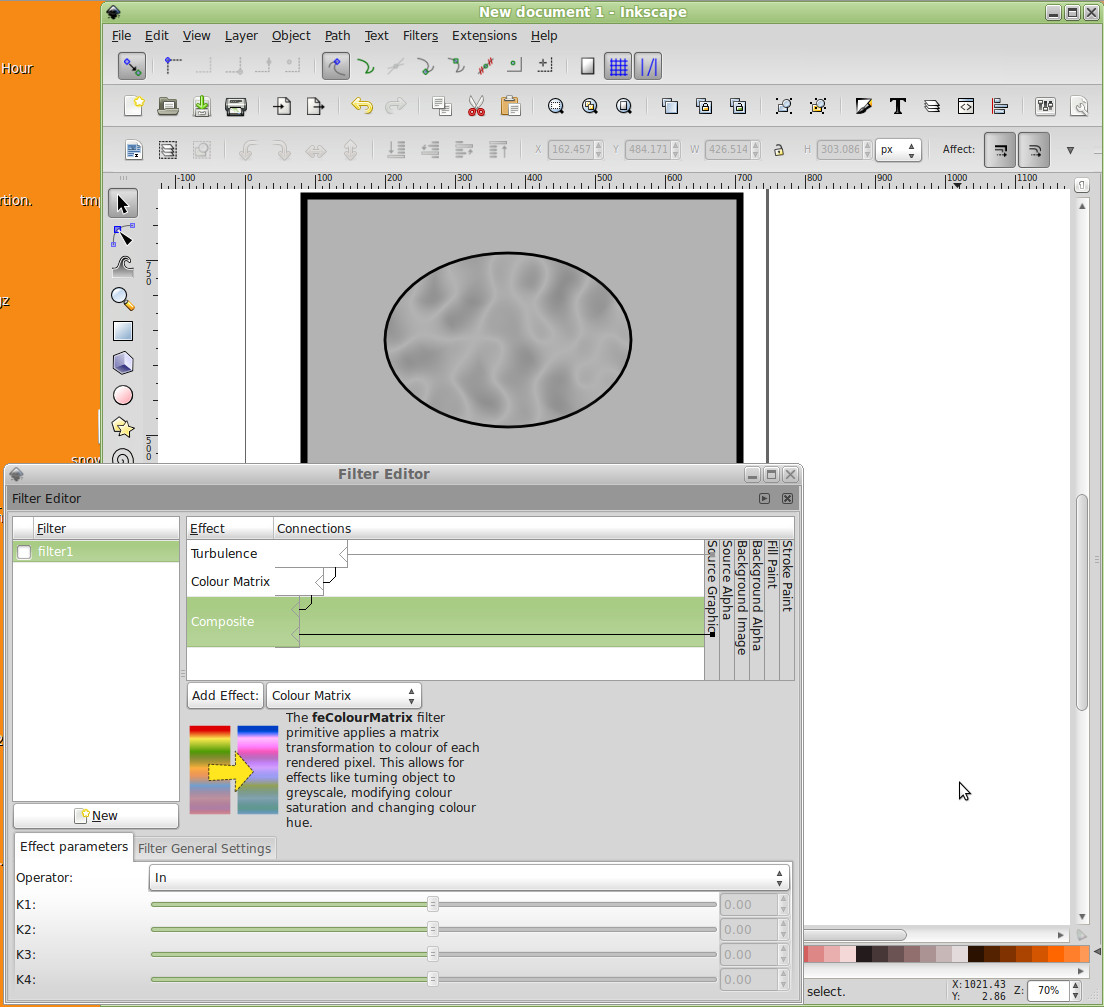
- composite_filter.jpg (188.02 KiB) Viewed 1070 times
-
TheJanitor
- Posts: 2
- Joined: Sat Feb 22, 2014 12:00 pm
Re: My first Conundrum... Is probably an easy fix...
Thanks Fellas