 This is a read-only archive of the inkscapeforum.com site. You can search for info here or post new questions and comments at
 I am new on inkscpae and needing help on making a logo for a friend.
I am stuck at making the letter K inbedded in a circle, like a outline of a circle with the k in the middle but the edges of the k inside the circle, but i am needing the edges of the k witha gap in the circle so i can put into a vinyl plotter, I am probably sounding stupid but i am gagging for help and spelling lessons. PLEASE HELP.
THANKS
IMAGE attatched to show what i mean with the "K" thanks guys
Help Beginner offsetting letters in a outline of circle.
Help Beginner offsetting letters in a outline of circle.
- Attachments
-
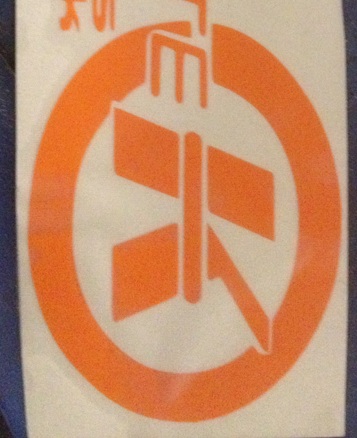
- sample k.jpg (52.23 KiB) Viewed 2198 times

Re: Help Beginner offsetting letters in a outline of circle.
Welcome to InkscapeForum!
I'm glad you showed us an image, because that certainly would have been hard to put into words! But I do have a couple of questions. Do you need to reproduce that exact image, with the E and some other stuff outside the top of of the image? Or that exact image but only the K? Or the circle with a different K?
When you say this
you mean like the areas I've circled in red here?
Correct?
But when you say this
I'm not quite clear. Are you restating the same thing in different words? Or is it a different kind of gap, besides the gap between the K and the circle?
I'm glad you showed us an image, because that certainly would have been hard to put into words! But I do have a couple of questions. Do you need to reproduce that exact image, with the E and some other stuff outside the top of of the image? Or that exact image but only the K? Or the circle with a different K?
When you say this
...like a outline of a circle with the k in the middle but the edges of the k inside the circle...
you mean like the areas I've circled in red here?
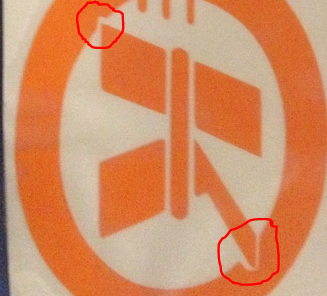
- samplek2.PNG (220.86 KiB) Viewed 2169 times
Correct?
But when you say this
...but i am needing the edges of the k witha gap in the circle so i can put into a vinyl plotter...
I'm not quite clear. Are you restating the same thing in different words? Or is it a different kind of gap, besides the gap between the K and the circle?
Basics - Help menu > Tutorials
Manual - Inkscape: Guide to a Vector Drawing Program
Inkscape Community - Inkscape FAQ - Gallery
Inkscape for Cutting Design
Manual - Inkscape: Guide to a Vector Drawing Program
Inkscape Community - Inkscape FAQ - Gallery
Inkscape for Cutting Design
Re: Help Beginner offsetting letters in a outline of circle.
well yes, need help creating that image. sorry about explaining it bad. I need to create a circle with the K and E inbedded in it, I find it hard to explain things, dyslexic.
Re: Help Beginner offsetting letters in a outline of circle.
No worries, and no need to apologize. I only needed more info so I can offer the best suggestions. And I need to ask one more question. Just above the E is part of something else sticking out. Do you need that too?
If you need to draw exactly that image, there may be a bit of a shortcut. You could use Path menu > Trace Bitmap, to get a black and white image. Then just change the color. The problem with that is that the photo appears to be of that logo (or whatever it is) on fabric or paper or plastic maybe (vinyl?), because it seems to be sort of wrinkled in places. And Trace Bitmap could pick up those wrinkles.
So that if you need this new logo to be used for perhaps printing or vinyl cutting, the results of the trace will probably not be as crisp and precise as might be needed for printing or cutting. So I'll explain the basics of drawing from scratch, for just the K and the circle. And then you can use the same technique for the E and whatever the other little part that's just above the E. And actually, it will take me a few minutes to write it up. So I'll post again shortly
If you need to draw exactly that image, there may be a bit of a shortcut. You could use Path menu > Trace Bitmap, to get a black and white image. Then just change the color. The problem with that is that the photo appears to be of that logo (or whatever it is) on fabric or paper or plastic maybe (vinyl?), because it seems to be sort of wrinkled in places. And Trace Bitmap could pick up those wrinkles.
So that if you need this new logo to be used for perhaps printing or vinyl cutting, the results of the trace will probably not be as crisp and precise as might be needed for printing or cutting. So I'll explain the basics of drawing from scratch, for just the K and the circle. And then you can use the same technique for the E and whatever the other little part that's just above the E. And actually, it will take me a few minutes to write it up. So I'll post again shortly
Basics - Help menu > Tutorials
Manual - Inkscape: Guide to a Vector Drawing Program
Inkscape Community - Inkscape FAQ - Gallery
Inkscape for Cutting Design
Manual - Inkscape: Guide to a Vector Drawing Program
Inkscape Community - Inkscape FAQ - Gallery
Inkscape for Cutting Design
Re: Help Beginner offsetting letters in a outline of circle.
First, I should say that there probably are other ways to do this. So this is how I would do it.
1 - Draw the circle. This is actually a small circle and a large circle, combined. But you could use one circle with a wide stroke, and then do Stroke to Path. But either way, the circle needs to be a path, and not an Ellipse shape.

2 - Type K. Choose the font, and make bold and italic, if necessary. Make it the proper size, and place it on top of the circle.
3 - I'm not sure if the K in the image is centered perfectly in the circle, since it seems to be attached to some other letters. It does look pretty close to centered though. If you need it to be centered here's how: Object menu > Align and Distribute > Align > Relative To: Last selected. Select the K first, hold Shift key, and then select the circle. Click "Center on vertical axis" button, then "Center on horizontal axis" button.

4 - Select the K and Edit menu > Duplicate (or command bar button). Hold Shift and click any color that's different than the letter (which is probably black). This adds a stroke to the letter. It doesn't matter which color, since it's going to disappear anyway, but it helps give a visual idea of the final result. Make the stroke as wide as the gap you need between the circle and the K. In my illustrations, the stroke is 5 px. And finally, do Path menu > Stroke to Path.

5 - Select the new different colored path and the circle (use Shift for multiple selection). Then Path menu > Difference.

And that's it! You can use the same Stroke to Path, and Path Difference technique on the E and the other little piece. It will result in a couple of tiny pieces between the 3...prongs of the E, which can simply be deleted. If it needs to be in the same orientation as your photo, do Ctrl + A to select all of it. It might make sense to do Object menu > Group (or command bar button) at this point. It will keep the pieces from coming apart accidentally. Although if you later need to select something, you might need to Ungroup first. Then click "Rotate selection 90 degrees clockwise" button on Selection tool control bar.
Let us know if you get stuck, or if this doesn't work for some reason. Have fun
1 - Draw the circle. This is actually a small circle and a large circle, combined. But you could use one circle with a wide stroke, and then do Stroke to Path. But either way, the circle needs to be a path, and not an Ellipse shape.
2 - Type K. Choose the font, and make bold and italic, if necessary. Make it the proper size, and place it on top of the circle.
3 - I'm not sure if the K in the image is centered perfectly in the circle, since it seems to be attached to some other letters. It does look pretty close to centered though. If you need it to be centered here's how: Object menu > Align and Distribute > Align > Relative To: Last selected. Select the K first, hold Shift key, and then select the circle. Click "Center on vertical axis" button, then "Center on horizontal axis" button.
4 - Select the K and Edit menu > Duplicate (or command bar button). Hold Shift and click any color that's different than the letter (which is probably black). This adds a stroke to the letter. It doesn't matter which color, since it's going to disappear anyway, but it helps give a visual idea of the final result. Make the stroke as wide as the gap you need between the circle and the K. In my illustrations, the stroke is 5 px. And finally, do Path menu > Stroke to Path.
5 - Select the new different colored path and the circle (use Shift for multiple selection). Then Path menu > Difference.
And that's it! You can use the same Stroke to Path, and Path Difference technique on the E and the other little piece. It will result in a couple of tiny pieces between the 3...prongs of the E, which can simply be deleted. If it needs to be in the same orientation as your photo, do Ctrl + A to select all of it. It might make sense to do Object menu > Group (or command bar button) at this point. It will keep the pieces from coming apart accidentally. Although if you later need to select something, you might need to Ungroup first. Then click "Rotate selection 90 degrees clockwise" button on Selection tool control bar.
Let us know if you get stuck, or if this doesn't work for some reason. Have fun
Basics - Help menu > Tutorials
Manual - Inkscape: Guide to a Vector Drawing Program
Inkscape Community - Inkscape FAQ - Gallery
Inkscape for Cutting Design
Manual - Inkscape: Guide to a Vector Drawing Program
Inkscape Community - Inkscape FAQ - Gallery
Inkscape for Cutting Design
Re: Help Beginner offsetting letters in a outline of circle.
Id just like to say, YOU ARE A LEGEND. haha Thank you so much, I know how to make the logo, all of it just from what you told me. I feel as if i should be paying you haha but i'v forked out too much already on this cutter and program signcutpro ect ect. And again, thanks!!
Re: Help Beginner offsetting letters in a outline of circle.
You're welcome, I hope it comes out great!
Just a note about SignCut. There are some specific things you need to do, to make the image work with it (which I can't remember at the moment). Look in the Cutters/Plotters subforum for some topics on SignCut (or use forum search). I know the info is there. Oh, and actually there might be an Inkscape extension.....look here in the Extension Repository http://wiki.inkscape.org/wiki/index.php ... Repository. I'm pretty sure I saw something there.
Just a note about SignCut. There are some specific things you need to do, to make the image work with it (which I can't remember at the moment). Look in the Cutters/Plotters subforum for some topics on SignCut (or use forum search). I know the info is there. Oh, and actually there might be an Inkscape extension.....look here in the Extension Repository http://wiki.inkscape.org/wiki/index.php ... Repository. I'm pretty sure I saw something there.
Basics - Help menu > Tutorials
Manual - Inkscape: Guide to a Vector Drawing Program
Inkscape Community - Inkscape FAQ - Gallery
Inkscape for Cutting Design
Manual - Inkscape: Guide to a Vector Drawing Program
Inkscape Community - Inkscape FAQ - Gallery
Inkscape for Cutting Design

Re: Help Beginner offsetting letters in a outline of circle.
brynn wrote:Make the stroke as wide as the gap you need between the circle and the K. In my illustrations, the stroke is 5 px. And finally, do Path menu > Stroke to Path.
Just a word of clarification, as this statement could be misunderstood: in SVG files the stroke always lies with its centre on the edge of the object - so half the stroke width is inside the object and half is outside it*. In that case Brynn's stroke of 5px actually results in a gap of 2.5px. So if you want a specific gap (rather than just judging it by eye) you'll probably have to double the value to get the stroke width.
* the next version of SVG may offer a way to change this, but for the current 1.x files produced by Inkscape this holds true
Re: Help Beginner offsetting letters in a outline of circle.
Oh yes! I realized that sort of late in the message and debated about explaining it. Clearly I decided not to explain. But it's so true! Thanks Xav
Basics - Help menu > Tutorials
Manual - Inkscape: Guide to a Vector Drawing Program
Inkscape Community - Inkscape FAQ - Gallery
Inkscape for Cutting Design
Manual - Inkscape: Guide to a Vector Drawing Program
Inkscape Community - Inkscape FAQ - Gallery
Inkscape for Cutting Design