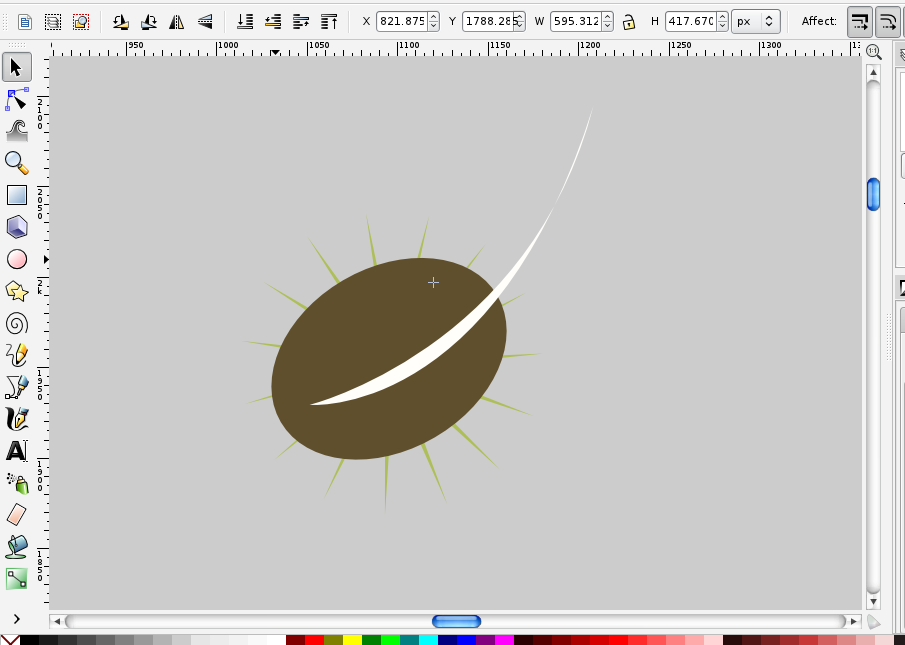
How can I delete this line?

Post questions on how to use or achieve an effect in Inkscape.
olsen731
Posts: 5
Joined: Sat Jun 22, 2013 3:20 am

How can I delete this line?

Postby olsen731 » Sat Jun 22, 2013 3:30 am

Hi,

If you reference the attached photo, I've made a coffee bean! The slit in the coffee bean was done using the bezier/pen tool :tool_pen: in inkscape and I would like to remove the portion of the white line that continues outside the silhouette of the bean. I've wrestled with this for a long time and would greatly appreciate any help!

Thanks!
Attachments
Screen Shot 2013-06-21 at 1.24.58 PM.png
Screen Shot 2013-06-21 at 1.24.58 PM.png (71.85 KiB) Viewed 1181 times

Lazur
Posts: 4717
Joined: Tue Jun 14, 2016 10:38 am

Re: How can I delete this line?

Postby Lazur » Sun Jun 23, 2013 10:29 am

Welcome aboard!

Duplicate the beam shape by pressing Ctrl+D when selected,
then add the white part to the selection by clicking on it while holding down Shift,
then press Ctrl+*.

olsen731
Posts: 5
Joined: Sat Jun 22, 2013 3:20 am

Re: How can I delete this line?

Postby olsen731 » Tue Jun 25, 2013 12:27 am

HI Lazur,

Glad to be aboard. Call me a newb but I tried those instructions and it's not doing anything. It's making a duplicate of the bean and adding the white slit to the selection no problem but when I press Ctrl+* nothing happens...

Lazur
Posts: 4717
Joined: Tue Jun 14, 2016 10:38 am

Re: How can I delete this line?

Postby Lazur » Tue Jun 25, 2013 6:49 am

Then try to call the same function through the path menu -path/intersect.
If it still doesn't work, you either have one of your objects a group or a clone,
or that bean shape is a spiro-path, while the other is a bezier path.
Most possibly that third one is the problem, if you used only the pen tool.
To convert the spiro-path to a regular one, save file as plain svg, then open it in a new window, and work with that.

olsen731
Posts: 5
Joined: Sat Jun 22, 2013 3:20 am

Re: How can I delete this line?

Postby olsen731 » Wed Jun 26, 2013 4:19 am

It worked! I both love you for helping me fix that and hate you for making it look so easy.

But really, you were right about the grouping. There was something funky going on though because I had ungrouped everything and it still wasn't working. So, just in case, I pasted it to an entirely new file and it worked like a charm. Thanks a bunch.

olsen731
Posts: 5
Joined: Sat Jun 22, 2013 3:20 am

Re: How can I delete this line?

Postby olsen731 » Wed Jun 26, 2013 4:20 am

It worked! I both love you for helping me fix that and hate you for making it look so easy.

But really, you were right about the grouping. There was something funky going on though because I had ungrouped everything and it still wasn't working. So, just in case, I pasted it to an entirely new file and it worked like a charm. Thanks a bunch.

Lazur
Posts: 4717
Joined: Tue Jun 14, 2016 10:38 am

Re: How can I delete this line?

Postby Lazur » Wed Jun 26, 2013 7:16 am

I'm glad you could do it by pasting the parts to a new file because pasting won't ungroup groups,
so then you may have entered the group -perhaps by double clicking on it, then copied the parts inside the group?
Who knows.


Return to “Help with using Inkscape”