 This is a read-only archive of the inkscapeforum.com site. You can search for info here or post new questions and comments at
Hi everyone,
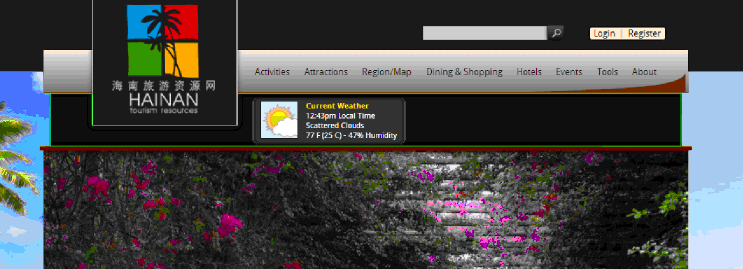
I'm pretty new to Inkscape, but I have been using it lately heavily to draw up mock designs for web sites, and I'm having troubles figuring out how to cut out something. I understand Clip Set, but I thought Clip release would do the opposite and it doesnt.
If I can direct your attention to the picture I've attached, you will see the bright green lines. That black are inside those lines are what I'd like to go away so that the beach picture behind it shows.
The only option I cna think is to clip-set both the above and below the black area, but that seems like I'd be going out of my way. A professional program like Inkscape must have the ability to cut... right?
Thanks so much,
Luna
Troubles cutting out selected path.
Troubles cutting out selected path.
- Attachments
-
- cut22.gif (47.58 KiB) Viewed 2086 times

Re: Troubles cutting out selected path.
Rather difficult to say from the screenshot, but you could try to put the green lines around the portion of which you want to be shown and clip it (it would be something like inverse from as it is now) or use this portion on the beach image ,)
* As of professional programs...
You`re editing raster image and Inkscape is not at it`s best on these tasks. Gimp or PS would be a better choice.
* As of professional programs...
You`re editing raster image and Inkscape is not at it`s best on these tasks. Gimp or PS would be a better choice.
 <<< click! - but, those with a cheaper tickets should go this way >>>
-
tylerdurden
- Posts: 2344
- Joined: Sun Apr 14, 2013 12:04 pm
- Location: Michigan, USA
Re: Troubles cutting out selected path.
If this is a page size mockup composed entirely in Inkscape, I'd just duplicate the background, clip it with the black rectangle and put it in the stack or layer under the square logo & widget.
If this is a webpage (not just a page-size image), there are a million ways to skin that cat.
If this is a webpage (not just a page-size image), there are a million ways to skin that cat.
Have a nice day.
I'm using Inkscape 0.92.2 (5c3e80d, 2017-08-06), 64 bit win8.1
The Inkscape manual has lots of helpful info! http://tavmjong.free.fr/INKSCAPE/MANUAL/html/
I'm using Inkscape 0.92.2 (5c3e80d, 2017-08-06), 64 bit win8.1
The Inkscape manual has lots of helpful info! http://tavmjong.free.fr/INKSCAPE/MANUAL/html/
Re: Troubles cutting out selected path.
This is a single image. A screenshot of the true website.
Re: Troubles cutting out selected path.
So, you`re asking how to cut / remove the black, which should than reveal the sky in the background, right?
<<< click! - but, those with a cheaper tickets should go this way >>> Re: Troubles cutting out selected path.
Correct. Basicly I Selected the area with a path... and now I'd like to do the exact oposite of Clip-Set.
instead of cutting everything else out and only keeping what i selected, i'd like to only delete what i've selected.
instead of cutting everything else out and only keeping what i selected, i'd like to only delete what i've selected.
Re: Troubles cutting out selected path.
 <<< click! - but, those with a cheaper tickets should go this way >>>
 Re: Troubles cutting out selected path.
This is not helpful or informative in anyway. I'm not asking anyone to photoshop anything, I'm trying to learn Inkscape.
I'm going to go out on a limb and say what I'm doing isn't something that can be done in Inkscape. I'm dissapointed, but I guess it was inevitable that I switch to photoshop eventually anyway.
I'm going to go out on a limb and say what I'm doing isn't something that can be done in Inkscape. I'm dissapointed, but I guess it was inevitable that I switch to photoshop eventually anyway.
Re: Troubles cutting out selected path.
Don`t get me wrong - it can be done with Gimp also
<<< click! - but, those with a cheaper tickets should go this way >>> -
tylerdurden
- Posts: 2344
- Joined: Sun Apr 14, 2013 12:04 pm
- Location: Michigan, USA
Re: Troubles cutting out selected path.
It might help if you upload your svg to dropbox for us to examine. It isn't clear what foreground element needs to be knocked-out.
For example, it the artwork includes a black shape with a green outline, maybe it's as simple as turning off the black fill. But, if the green outline is just an indicator of which black area to remove, what's in the foreground getting removed?

For example, it the artwork includes a black shape with a green outline, maybe it's as simple as turning off the black fill. But, if the green outline is just an indicator of which black area to remove, what's in the foreground getting removed?
Have a nice day.
I'm using Inkscape 0.92.2 (5c3e80d, 2017-08-06), 64 bit win8.1
The Inkscape manual has lots of helpful info! http://tavmjong.free.fr/INKSCAPE/MANUAL/html/
I'm using Inkscape 0.92.2 (5c3e80d, 2017-08-06), 64 bit win8.1
The Inkscape manual has lots of helpful info! http://tavmjong.free.fr/INKSCAPE/MANUAL/html/
Re: Troubles cutting out selected path.
Are those really a flat image in the webpage?
If you don't have the original background image used at that page, just that screenshot, possibly anything can be behind those parts you want to get rid off.
Like on the above example image, if you would have only the right part, with the boxer, you couldn't reproduce what was beneath him before flattening the layers.
Thus the problem is out of the technical range of any graphic technics.
You can only cheat the eye with a possible approximation.
And as the image you want to draw to is a photograph, you could use a raster editor program with better luck.
If you don't have the original background image used at that page, just that screenshot, possibly anything can be behind those parts you want to get rid off.
Like on the above example image, if you would have only the right part, with the boxer, you couldn't reproduce what was beneath him before flattening the layers.
Thus the problem is out of the technical range of any graphic technics.
You can only cheat the eye with a possible approximation.
And as the image you want to draw to is a photograph, you could use a raster editor program with better luck.