drag object and lose content

Post questions on how to use or achieve an effect in Inkscape.
drelo
Posts: 4
Joined: Tue May 28, 2013 11:50 am

drag object and lose content

Postby drelo » Tue May 28, 2013 11:58 am

I a newbie with inkscape but with experience with editing images.

I have a question. Another program produced a .svg image it a long image along the Y axis so I wanted to crop it and split in half as a first measure. Along the whole figure there are circles in black and little circles within them.

Whatever I do to crop resize etc I end losing the color shape below the black circles surrounding them. I tried to drag group- ungroup the whole content but I end in the same situation. Is there a way to alter this so I can freely delete the shapes near the top and handle the bottom of the figure.

Thanks in advance :)

User avatar
brynn
Posts: 10309
Joined: Wed Sep 26, 2007 4:34 pm
Location: western USA
Contact:

Re: drag object and lose content

Postby brynn » Tue May 28, 2013 1:30 pm

Image
Welcome to InkscapeForum!

It's a little hard to understand what you're describing. Sometimes a very large image seems to go whacko when you move it the slightest bit. But it's often just a problem with the way Inkscape renders it. The image hasn't really changed at all. How large is this image (dimensions and kb or mb). Would you be able to share the SVG file with us?

drelo
Posts: 4
Joined: Tue May 28, 2013 11:50 am

Re: drag object and lose content

Postby drelo » Wed May 29, 2013 12:16 am

Thanks for the quick response and your help.

I seems ~ 280 kb I think the problem is the little pieces that compose it. The dimens
Notice the empty circles at the bottom those are the problematic one. It's there any trick to render it better because as soon as I try to ungroup or resize I lost those circles...
I have to crop the image but it's attached now.
Attachments
tarta.svg
(202.66 KiB) Downloaded 164 times

drelo
Posts: 4
Joined: Tue May 28, 2013 11:50 am

Re: drag object and lose content

Postby drelo » Wed May 29, 2013 12:26 am

Is there a way to clone or duplicate the sector I want in another file?

drelo
Posts: 4
Joined: Tue May 28, 2013 11:50 am

Re: drag object and lose content

Postby drelo » Wed May 29, 2013 1:01 am

I noticed something that might help to solve it...
While I was removing some objects in order to pick apart the unwanted objects from the desired ones it seems that "rotate" is the action that blows away the circles. But I didn't do nothing in particular I was just pick and deleting one of the circles or lines above the ones I want.

Lazur
Posts: 4717
Joined: Tue Jun 14, 2016 10:38 am

Re: drag object and lose content

Postby Lazur » Wed May 29, 2013 3:42 pm

Opened your attached image.
You ran into an issue that is caused by the too small size of your drawing.
Some of your circles are less than 0,231 sized, wich can hardly handled by any program.
Scale up your drawing, and it will magically correct most of the problematic parts.
Some manual node editing is still needed after though.

User avatar
brynn
Posts: 10309
Joined: Wed Sep 26, 2007 4:34 pm
Location: western USA
Contact:

Re: drag object and lose content

Postby brynn » Fri May 31, 2013 10:27 am

Well, I've been able to delete the top half of the drawing without creating any distortions in the bottom half (that didn't already exist before). I don't see any misbehavior in the file.

In the file that you provided, the larger black circles are not always completely filled. Many of them seem to be ovals inside of circles, with some triangles. The triangles make the larger black circles appear to be pie charts, at least when the oval shape of the fill doesn't distract from that impression too much.

I wonder if the problems that you're seeing weren't there all along? Maybe you deleted some content first, without noticing the oval filled circles? Then when you zoomed in to what was left, you noticed the ovals?

Or is the file you showed us not the original?

Edit
Yes, Lazur, when I make one of the circles larger, the previous oval fill automatically fills the circle. Those oval fills must be a result of something related to the other program that was used. Because Inkscape certainly can fill such small objects easily. I've done it in the same file, on one of the original circles, with no issues.

So one option for drelo would be to recreate the objects which somehow became ovals instead of circles.

Lazur
Posts: 4717
Joined: Tue Jun 14, 2016 10:38 am

Re: drag object and lose content

Postby Lazur » Fri May 31, 2013 10:39 am

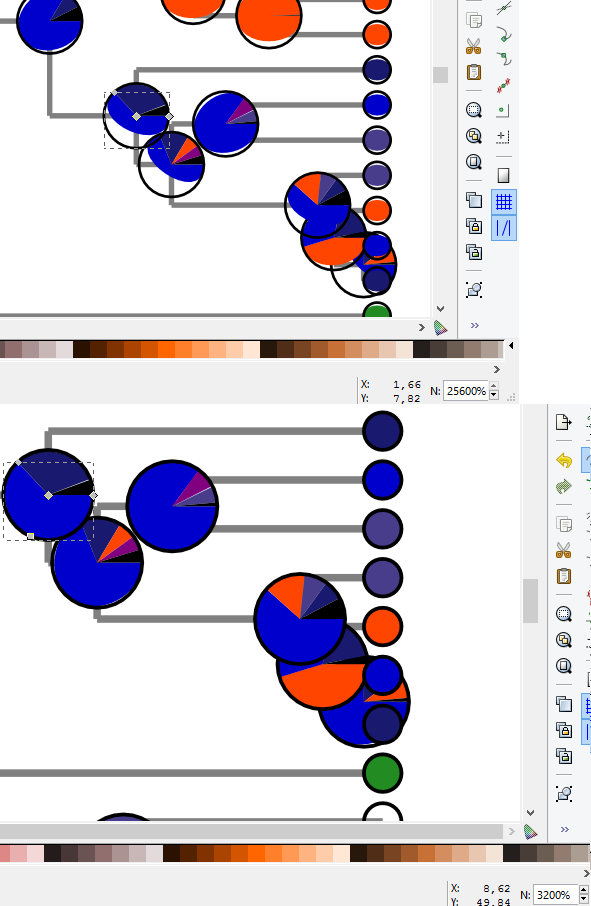
Attached is how it behaves only by scaling up the drawing.
No nodes were edited manually.

Edit:
This file was saved with inkscape based on the codes.
The selected parts
looks like

Code: Select all

 <path
     inkscape:connector-curvature="0"
     id="1445"
     d="m 1.8022144,13.829655 a 0.12684971,0.12684971 0 1 0 0.1741536,0.117696 l -0.1268495,0 -0.047307,-0.117696"
     style="fill:#0000cd;stroke:none" />


After scaling it up:

Code: Select all

<path
     inkscape:connector-curvature="0"
     id="1445"
     d="M 219.48055,0 A 350,350 0 1 0 700,324.74362 l -349.99973,0 L 219.47186,0"
     style="fill:#0000cd;stroke:none" />


When redrawing it for a comparison, the codes are in plain svg:

Code: Select all

<path
     d="m 150,344.75323 c 0,184.46311 -149.53689356,334 -334,334 -184.46311,0 -334,-149.53689 -334,-334 0,-136.3736 82.90893,-259.050253 209.44508,-309.90655 L -184,344.75323 z"
     transform="matrix(1.0479042,0,0,1.0479042,542.81438,-36.515131)"
     id="path3758"
     style="fill:#0000cd;fill-opacity:1;stroke:none" />


So those objects are not paths technically, but connectors.
Drawn with Ctrl+F2?
Weird, it doesn't work right. Even not if saved as plain svg.
Codes are alike then:

Code: Select all

<path
     d="m 1.8022144,13.829655 a 0.12684971,0.12684971 0 1 0 0.1741536,0.117696 l -0.1268495,0 -0.047307,-0.117696"
     id="1445"
     style="fill:#0000cd;stroke:none" />

But still doesn't behaving as a path.
Also you can't convert it to be a path, just use the Ctrl++, which will turn it to a real path.
Attachments
iss1.png
iss1.png (89.11 KiB) Viewed 1280 times


Return to “Help with using Inkscape”