 This is a read-only archive of the inkscapeforum.com site. You can search for info here or post new questions and comments at
 I'm using Inkscape to add labeling to features on PDF engineering drawings and while the drawings generally open correctly and save correctly as SVG files, when I attempt to save them as PDFs all of the Es on the drawing get turned into 8s. More accurately all of the Es get a vertical line added to the right side, so they look like squared off 8s.
Is there any way to fix this? I need to be able to save these drawings as PDFs and no other program I've tried (I'm trying to avoid buying premier for this) has been as consistently accurate in importing and saving these files as Inkscape except for this E->8 issue.
Es turning into 8s when saving PDFs
Es turning into 8s when saving PDFs
- Attachments
-
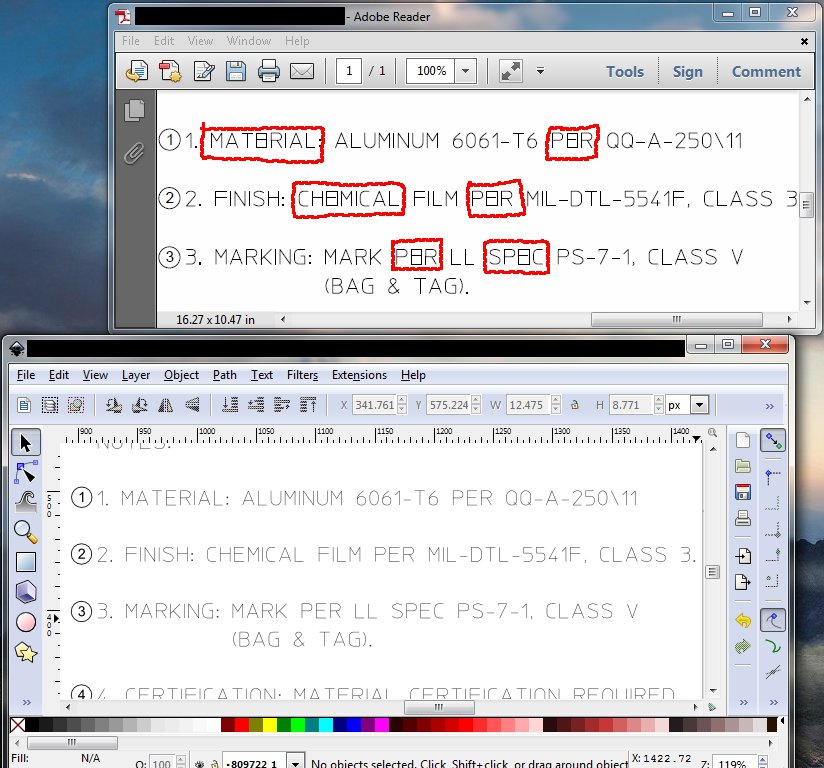
- Example of what I'm talking about. PDF is on top, SVG on the bottom.
- E to 8 example.jpg (129.52 KiB) Viewed 1766 times

Re: Es turning into 8s when saving PDFs

Welcome to InkscapeForum!
How very strange!
Does this only happen when you view the text on the internet? Did you use regular text or flowed text? Flowed text is created when you click and drag with the Text tool, to create a text box (thin blue line around text) before you start to type. For regular text, you should just click once, then start typing.
If it's not flowed text, I'm clueless
 . Would you be able to share the SVG file, for testing? Also, what is your operating system and Inkscape version?
Basics - Help menu > Tutorials
Manual - Inkscape: Guide to a Vector Drawing Program
Inkscape Community - Inkscape FAQ - Gallery
Inkscape for Cutting Design
Manual - Inkscape: Guide to a Vector Drawing Program
Inkscape Community - Inkscape FAQ - Gallery
Inkscape for Cutting Design

Re: Es turning into 8s when saving PDFs
The font is defective I think. Just a guess - I'm not a fontographer. The e is probably described as an open path which Inkscape - and many programs - draws correctly but PDF may not support open path fonts. try converting the text - or just one line of it - to paths (path menu and try the export again. If the e looks good then you can convert all your text - or use another font...
Your mind is what you think it is.
Re: Es turning into 8s when saving PDFs
So these are machining drawings made by some kind of machining drawing software. Possibly CAD software. I don't know what the font used is, but Inkscape doesn't recognize it as a font. It seems to think it's just shapes, the middle bar of the E is not part of the same object as the top, back and bottom. It seems for some reason it's turning the top, back, and bottom into a rectangle by adding a front. I don't know why, but it's only doing it on PDF export.
Unfortunately I can't share any more than what is in that image as these are controlled government documents.
All I'm doing is adding numbering to the drawing features for the purposes of creating inspection reports. I did not create the drawings and I don't know who did or what software they used. Also, no, it doesn't have anything to do with viewing the text on the internet. That screenshot is from adobe reader.
Unfortunately I can't share any more than what is in that image as these are controlled government documents.
All I'm doing is adding numbering to the drawing features for the purposes of creating inspection reports. I did not create the drawings and I don't know who did or what software they used. Also, no, it doesn't have anything to do with viewing the text on the internet. That screenshot is from adobe reader.
Re: Es turning into 8s when saving PDFs
Also: I converted the Es (or rather the lines forming the top, back, and bottom of the Es) into paths, and that fixed it. However it's really irritating to have to go through and convert every E individually into a path. Is there a better way to do this?
Re: Es turning into 8s when saving PDFs
Hhm...I'm somewhat confused. I thought you were adding the text to a pre-existing drawing. So it would seem that you should know the font name. But maybe you're changing existing text as well as adding more?
If there is a way to select all the text at once (possibly using Edit menu > Find) you could convert all the text to path at once. However, if Inkscape isn't recognizing the text....well, all you can do is try. Maybe you can find some other variable to search with, using Find?
If there is a way to select all the text at once (possibly using Edit menu > Find) you could convert all the text to path at once. However, if Inkscape isn't recognizing the text....well, all you can do is try. Maybe you can find some other variable to search with, using Find?
Basics - Help menu > Tutorials
Manual - Inkscape: Guide to a Vector Drawing Program
Inkscape Community - Inkscape FAQ - Gallery
Inkscape for Cutting Design
Manual - Inkscape: Guide to a Vector Drawing Program
Inkscape Community - Inkscape FAQ - Gallery
Inkscape for Cutting Design
Re: Es turning into 8s when saving PDFs
It sounds like a solution although not great. Why don't you select a few words of text, copy them to another file (BTW make sure there's an E in it  ) and post that file here? that way those secret Sopwith Camel blueprints aren't distributed all over the Internet where the Red Baron can get his hands on them.
) and post that file here? that way those secret Sopwith Camel blueprints aren't distributed all over the Internet where the Red Baron can get his hands on them.Your mind is what you think it is.
Re: Es turning into 8s when saving PDFs
I'm just adding some numbers by dimensions on the pre-existing drawing. The text which I am having issues with was already on the drawing when I got it.
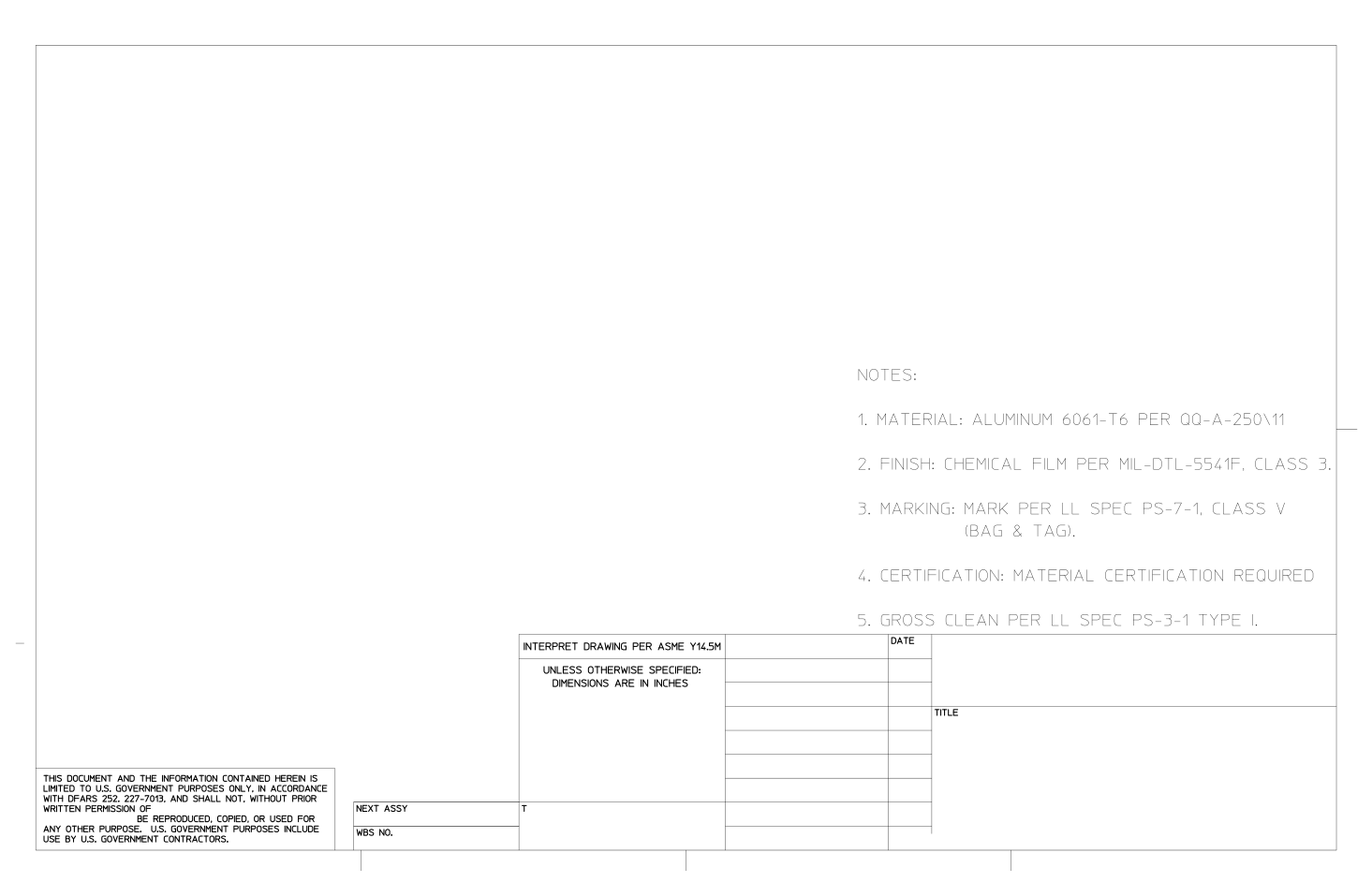
Here's a sample file. I cut out all of the critical information but there's plenty left to demonstrate the problem.
Here's a sample file. I cut out all of the critical information but there's plenty left to demonstrate the problem.
- Attachments
-
- Sample Drawing 2.svg
- (226.28 KiB) Downloaded 163 times
Re: Es turning into 8s when saving PDFs
Hello
Well, just "sticking my nose here"
First, it's a classic problem, i believe: incomptibilities whitin inkscape-svg format and pdf format.
All the letters are paths, not font letters. To be more precise, those paths are only the strokes.
- Using pdfcreator (a virtual pdf printer) render the paths just fine. But it's necesary to specify the dimensions of the page (it's bigger than a A4, but it's not A3). So if there are several pages it will consume time, configurating the pages. There are other pdf printers.
- The other way is selecting all the text and convert it using STROKE to PATHS. In my computer, It expends a lot of time, more than the first solution.
Maybe there are other options...
Greetings
Well, just "sticking my nose here"
First, it's a classic problem, i believe: incomptibilities whitin inkscape-svg format and pdf format.
All the letters are paths, not font letters. To be more precise, those paths are only the strokes.
- Using pdfcreator (a virtual pdf printer) render the paths just fine. But it's necesary to specify the dimensions of the page (it's bigger than a A4, but it's not A3). So if there are several pages it will consume time, configurating the pages. There are other pdf printers.
- The other way is selecting all the text and convert it using STROKE to PATHS. In my computer, It expends a lot of time, more than the first solution.
Maybe there are other options...
Greetings
If you have problems:
1.- Post a sample (or samples) of your file please.
2.- Please check here:
http://tavmjong.free.fr/INKSCAPE/MANUAL/html/index.html
3.- If you manage to solve your problem, please post here your solution.
1.- Post a sample (or samples) of your file please.
2.- Please check here:
http://tavmjong.free.fr/INKSCAPE/MANUAL/html/index.html
3.- If you manage to solve your problem, please post here your solution.
Re: Es turning into 8s when saving PDFs
Is there any reason I wouldn't want to simply select the entire document and convert stroke to path? If that won't have any negative affect on the drawing then that would only take a second.
Edit: Ah I see it's processing time. Took about a minute to convert that sample file from stroke to path. Well, that's not that bad. I figure 5-10 minutes for a complex drawing. No big deal, that's probably going to be my go-to solution assuming it doesn't change anything about the way it looks and prints (aside from fixing the E issue). The only funny thing is that while it takes a while it doesn't come anywhere near full processor or memory utilization. I assume that's because inkscape isn't optimized for multiple cores?
Edit: Ah I see it's processing time. Took about a minute to convert that sample file from stroke to path. Well, that's not that bad. I figure 5-10 minutes for a complex drawing. No big deal, that's probably going to be my go-to solution assuming it doesn't change anything about the way it looks and prints (aside from fixing the E issue). The only funny thing is that while it takes a while it doesn't come anywhere near full processor or memory utilization. I assume that's because inkscape isn't optimized for multiple cores?
Re: Es turning into 8s when saving PDFs
druban wrote:It sounds like a solution although not great.
not great?? .....Wwell!!
Since seeing the file, I see that it's not only not great, but also an inappropriate solution. The text is already made with paths, for some reason. I did a test export and find the exact some problem. Let me see if I can open the PDF with Inkscape. I"ll be interested to see what kind of objects they are, the part that's added....
Ok, I think I see what's happening. The existing text is not text at all. It's constructed with paths. The E is actually a squared off C (top, left side, and bottom) with an extra hash mark (another path). They're made of 5 nodes, but could just as easily be 4 nodes. For some reason which I don't understand, the PDF conversion successfully closes the open paths of the E. I don't know why it does that. Let me do a test....maybe if the paths are broken, it won't be able to close.
Well, that does seem to prevent the automatic closing of the open path, by the adding of the new line. I first select an "E", then selected the 2 corner nodes, the clicked "Break path at selected nodes" button. And now PDF export does not produce the extra line. But how to do that quickly, for all the "E"s, is another matter. Unless someone can come up with a quick way to select all the Es, or more correctly, the path which forms the backbone of the E....
You could Select All, but that leaves as the only choice, breaking every path at every node! I can't think of any way, even using Find dialog, to select just those "E"s. Well, I hope you're having some luck with Stroke to Path. Because this route (breaking the paths to prevent them from being automatically closed) is going nowhere pretty darn fast, lol!
Unless you can find a way to prevent the text from already being converted to paths.....before you ever open it with Inkscape? I think you said they come to you as PDF already. But maybe I've misunderstood that part? If you have any control over having that text already converted to paths, and you can find a way to prevent that, you can prevent the problem itself.
Although no....as I think about it, this text has not simply been converted to paths, not in the sense that we usually think of. If we type some text and convert to path, the result is something different from what you have in those files. Lol, we've actually had several requests for converting text into the kind of paths that you have in those PDF files! It could have definite benefits. So if you actually know how that happened, I'm sure we would be interested to know! But unfortunately, I know, that doesn't help you much with your problem

Yes, you're correct. Inkscape is not very good at utilizing RAM or different cores/threads. If you have slow performance that's traceable to filters, you can define the number of threads/cores, and get some pretty good improvement. But for reasons I don't understand, it's only available for filters (which are typically raster content). The next version coming down the pike is supposed to improve on the RAM utilization, but I couldn't say how much, since I haven't seen it yet. druban could probably say, since I think he does use a dev version. Of course you'd be welcome to use a dev version of 0.49, if you like. But considering how stable the stable versions are, I'm not going near a dev version, lol. But that's just me!
Stroke to Path could affect the rest of the drawing. But it's hard to say how or how much, without knowing more about its content, which of course, I know you can't show us. But if it does negatively affect it, you'll see it.
So I guess the bottom line is that unless you can prevent the text being converted to those paths, or the Stroke to Path plan does work, you may be stuck.
Basics - Help menu > Tutorials
Manual - Inkscape: Guide to a Vector Drawing Program
Inkscape Community - Inkscape FAQ - Gallery
Inkscape for Cutting Design
Manual - Inkscape: Guide to a Vector Drawing Program
Inkscape Community - Inkscape FAQ - Gallery
Inkscape for Cutting Design
Re: Es turning into 8s when saving PDFs
brynn wrote:
not great?? .....Wwell!!
Since seeing the file, I see that it's not only not great, but also an inappropriate solution. The text is already made with paths, for some reason. I did a test export and find the exact some problem. Let me see if I can open the PDF with Inkscape. I"ll be interested to see what kind of objects they are, the part that's added....
Ok, I think I see what's happening. The existing text is not text at all. It's constructed with paths. The E is actually a squared off C (top, left side, and bottom) with an extra hash mark (another path). They're made of 5 nodes, but could just as easily be 4 nodes. For some reason which I don't understand, the PDF conversion successfully closes the open paths of the E. I don't know why it does that. Let me do a test....maybe if the paths are broken, it won't be able to close.
Weirdly despite what you say about the text already being paths, selecting the "E"s and hitting stroke to path does fix the problem.
brynn wrote:Well, that does seem to prevent the automatic closing of the open path, by the adding of the new line. I first select an "E", then selected the 2 corner nodes, the clicked "Break path at selected nodes" button. And now PDF export does not produce the extra line. But how to do that quickly, for all the "E"s, is another matter. Unless someone can come up with a quick way to select all the Es, or more correctly, the path which forms the backbone of the E....
You could Select All, but that leaves as the only choice, breaking every path at every node! I can't think of any way, even using Find dialog, to select just those "E"s. Well, I hope you're having some luck with Stroke to Path. Because this route (breaking the paths to prevent them from being automatically closed) is going nowhere pretty darn fast, lol!
As I said above, selecting everything and hitting stroke to path seems to work, but I haven't gone over a drawing in detail after doing so to see if it changes anything it shouldn't. Also, given that sometimes Inkscape has problems interpreting these drawings (puts lines in the wrong place, removes arrows or even entire sections of text, etc.) even if it doesn't cause any problems on my test drawing I can't guarantee it wouldn't cause issues with another one. That said, it looks like the only solution for now.
brynn wrote:Unless you can find a way to prevent the text from already being converted to paths.....before you ever open it with Inkscape? I think you said they come to you as PDF already. But maybe I've misunderstood that part? If you have any control over having that text already converted to paths, and you can find a way to prevent that, you can prevent the problem itself.
Unfortunately these drawings arrive like this, I think they may be generated from CAD software, but I don't know what software. I generally don't have direct correspondence with our customers unless there's a quality problem so I haven't even talked to the person who is providing us with these drawings. I suppose if I had to I could go to them about this but I'd rather not.
brynn wrote:Although no....as I think about it, this text has not simply been converted to paths, not in the sense that we usually think of. If we type some text and convert to path, the result is something different from what you have in those files. Lol, we've actually had several requests for converting text into the kind of paths that you have in those PDF files! It could have definite benefits. So if you actually know how that happened, I'm sure we would be interested to know! But unfortunately, I know, that doesn't help you much with your problem
Given that this text was most likely generated by a CAD program I doubt it would be possible to use it to edit text in the way you want. Even if it could, that sort of software is generally 8-12 thousand dollars for one seat, so it would be completely impractical.
brynn wrote:Yes, you're correct. Inkscape is not very good at utilizing RAM or different cores/threads. If you have slow performance that's traceable to filters, you can define the number of threads/cores, and get some pretty good improvement. But for reasons I don't understand, it's only available for filters (which are typically raster content). The next version coming down the pike is supposed to improve on the RAM utilization, but I couldn't say how much, since I haven't seen it yet. druban could probably say, since I think he does use a dev version. Of course you'd be welcome to use a dev version of 0.49, if you like. But considering how stable the stable versions are, I'm not going near a dev version, lol. But that's just me!
The time it takes to do the conversion, while slightly annoying, is not enough of an irritation to worry about. I'll only be using it a few times a week and since it's not really hogging system resources I can work on other things while it completes.
brynn wrote:Stroke to Path could affect the rest of the drawing. But it's hard to say how or how much, without knowing more about its content, which of course, I know you can't show us. But if it does negatively affect it, you'll see it.
So I guess the bottom line is that unless you can prevent the text being converted to those paths, or the Stroke to Path plan does work, you may be stuck.
Hopefully Stroke to Path is the solution. I've seen no problems so far, but the next time I get a complex drawing I need to work on I'll test it out and see what happens.
Re: Es turning into 8s when saving PDFs
Converting the stroke to path results in unnecessary nodes, increasing your file size.
Here is a solution that seemed to work for me on your file:
select the text with same stroke size, then combine the paths with Crrl+k.
This can be used for the border as well.
Here is a solution that seemed to work for me on your file:
select the text with same stroke size, then combine the paths with Crrl+k.
This can be used for the border as well.