This is a read-only archive of the inkscapeforum.com site. You can search for info here or post new questions and comments at
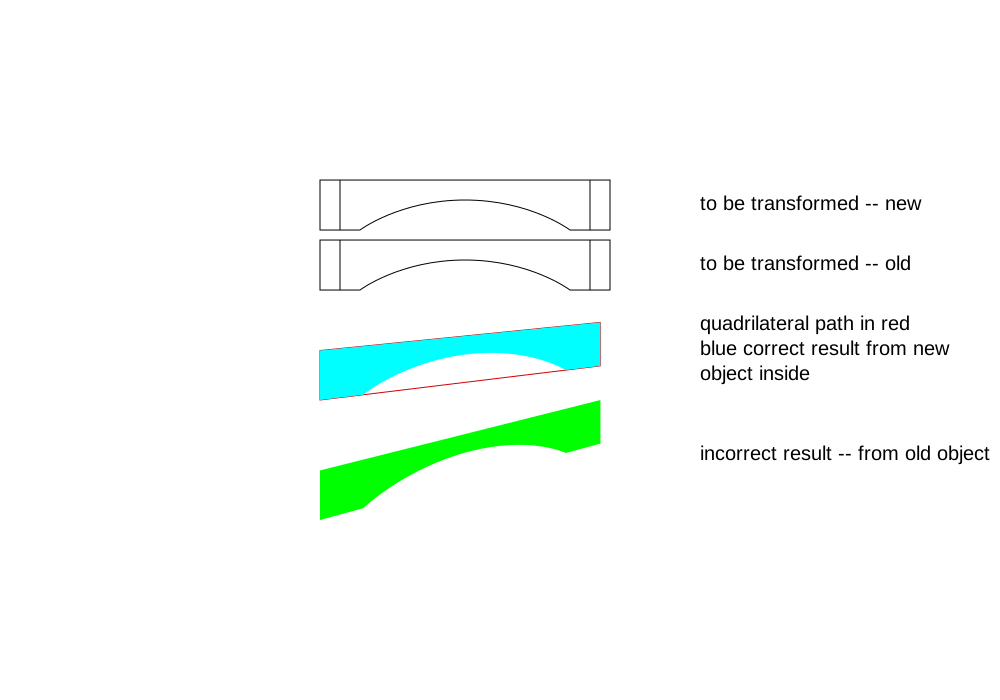
Aaaarrggh!! This Perspective extension is giving me fits, and I can't for the life of me figure out what's going wrong. The quadrilateral path is made properly. I'm selecting the object first and the quadrilateral path 2nd. Every now and then, I get a correct result, where the result fits perfectly inside the quadrilateral path. But most of the time I get the result like you see in the attached file.
Note that I have everything in a new 2nd layer, to prevent any potential problems from my landscape oriented custom default doc (transform attribute related bug). The object is a compound path with 3 subpaths. In another recent topic, I learned to remove the stroke (and add a fill) to make the new paths fit precisely (rather than slightly inset) so that's why my result is filled with no stroke. But the extension isn't working either way right now.
At first, I was using the actual face of a 3D box. But then I realized it was going in the wrong direction. So the quad. path in the file is drawn fresh (I've redrawn it several times). Hmm...let me draw the main object fresh....
 It worked! Wow!
Can anyone figure out what's going wrong with the old path and what's going right with the new one?
I looked in the XML Editor, and I see that the old object has an attribute that the new one doesn't have. inkscape:connector-curvature (value = 0) Is that what's causing the problem, and if so, why? I actually pasted both the object and the quadrilateral path from another doc. So did that attribute get there as a result of the paste? Or maybe it got there by applying the extension and then undoing? Could that prevent it from working the next time?
Is it even possible to figure out what's causing the problem? And if so, can anyone figure it out?
Thank you very much

PS -- There must be a place to look up what each attribute does or is responsible for? Errrr....well, let me do some searching. If I can't find anything, I'll ask for a tip
 Thanks again
 Edit