 This is a read-only archive of the inkscapeforum.com site. You can search for info here or post new questions and comments at
Hi.
I can't fid a short title that describe what I'm trying to achieve. I give it a try anyway.
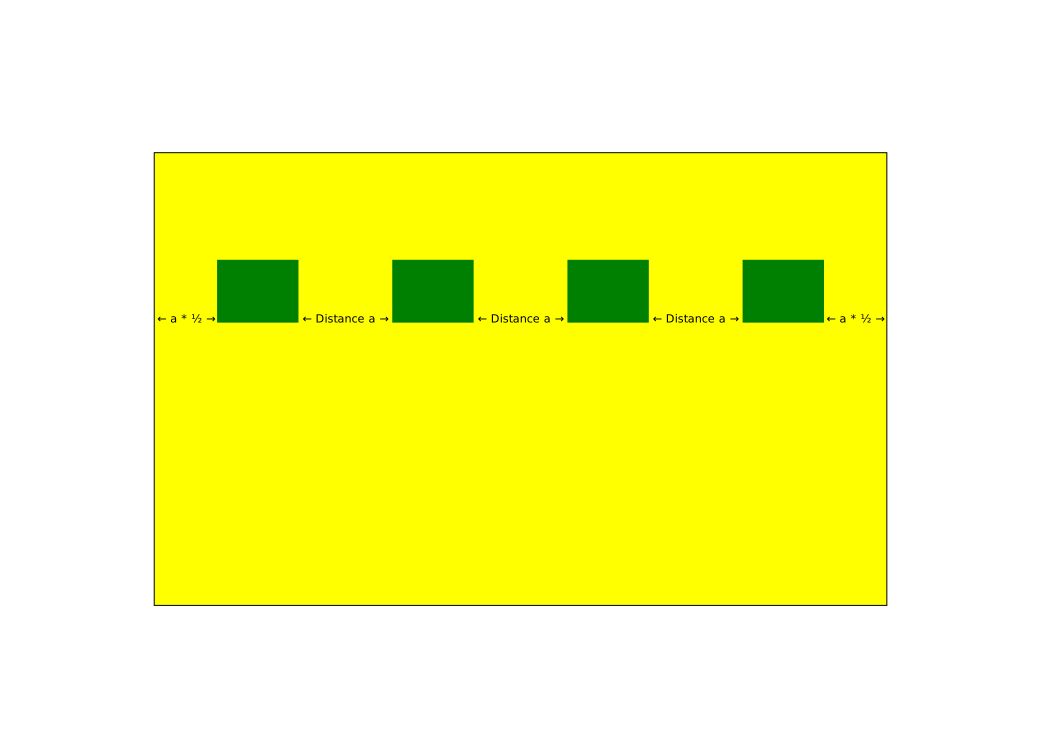
I have a large rectangle and a number of smaller rectangles that is lined up horisontallly inside (above) the larger rectangle.
The horizontal distance between each of the small rectangles should be equal, while the distance between the outermost smell rectangles to the edge of the big rectangle is excactly half the distance between each small rectangles.
I know that I can calculate the distances using a simple calculator, but I want to use built-in features in Inkscap such as alignment, guides etc.
I attach a svg that depicts what I mean.
Is this possible using no other tools than Inkscape itself?
Thanks
[Solved] Alignment of objects in a box
[Solved] Alignment of objects in a box
- Attachments
-
- HalfSpaceMostOuter.svg
- (7.26 KiB) Downloaded 212 times
Last edited by Grobe on Mon Jul 01, 2013 1:19 am, edited 1 time in total.

Re: Alignment of objects in a box
Attached is an explanation of some ways of doing this, with the use of the align and distribute panel,
and with the use of the create tiled clones option.
Hope there are not much typos in it and that it is clear enough.
and with the use of the create tiled clones option.
Hope there are not much typos in it and that it is clear enough.
- Attachments
-
- HalfSpaceMostOuter2.svg
- (50.88 KiB) Downloaded 192 times
Re: Alignment of objects in a box
Hi.
The explanation is nice and easy to understand. Unfortunately It doesn't work unless the width of the bigger box is a multiply of the width of the smaller green boxes.
The green box original width is 733,857 px while the green ones is 81,429 px wide. I'm not allowed to change alter the size of the boxes, sorry I forgot to mention that in the first post
I did follow the directions given by Lazur, but when used on the original sized boxes, the distance between two green boxes was greater than twice the distance of the edge of the big box and the nearest edge of one of the outermost green boxes.
I'm about to create a spread sheet that hopefully will calculate the correct values, as I cannot manage to find a more practically solution myself.
The explanation is nice and easy to understand. Unfortunately It doesn't work unless the width of the bigger box is a multiply of the width of the smaller green boxes.
The green box original width is 733,857 px while the green ones is 81,429 px wide. I'm not allowed to change alter the size of the boxes, sorry I forgot to mention that in the first post
I did follow the directions given by Lazur, but when used on the original sized boxes, the distance between two green boxes was greater than twice the distance of the edge of the big box and the nearest edge of one of the outermost green boxes.
I'm about to create a spread sheet that hopefully will calculate the correct values, as I cannot manage to find a more practically solution myself.
Re: Alignment of objects in a box
Uh sorry I just went by the look and it seemed that the green rectangles where the same size as the gaps.
Still, it is possible to handle the situation with the align and distribute options,
only the tiled clone method would take a bit more calculations.
Attached is a workflow for that.
But for practical reasons -like anti-aliasing, fixed template and page sizes- I suggest to use even numbers for the objects.
Still, it is possible to handle the situation with the align and distribute options,
only the tiled clone method would take a bit more calculations.
Attached is a workflow for that.
But for practical reasons -like anti-aliasing, fixed template and page sizes- I suggest to use even numbers for the objects.
- Attachments
-
- HalfSpaceMostOuter3.svg
- (29.78 KiB) Downloaded 187 times
Re: Alignment of objects in a box
I wasn't capable to follow the diretions in your explanation, so I have to ask you some question about that.
Can you explain the gray rectangle (group with ID "g3524")?
Also, shouldn't the sum of shapes and gaps be equal the width of the big yellow rectangle?
The spacer object seems to go from one gray rectangle, becoming two thin rectangles. Why?
What about the end result? The green rectangles looks much smaller than the original ones.
Can you explain the gray rectangle (group with ID "g3524")?
Also, shouldn't the sum of shapes and gaps be equal the width of the big yellow rectangle?
The spacer object seems to go from one gray rectangle, becoming two thin rectangles. Why?
What about the end result? The green rectangles looks much smaller than the original ones.
Re: Alignment of objects in a box
The sum of the shapes and the gaps should be equal with the yellow one in your example,
but for the method I used that red rectangle instead for that sum.
Used different sized objects than the original for showing the method, making the gap and shape width distance differ more, I hoped it would be more clear.
The grey rectangle in that group was placed in randomly in that mentioned group, right in the next step it was aligned next to the green object, the one that "sums up" the shapes.
Then another rectangle was aligned to the edge of the red rectangle, to produce an object wich has a width the sum of the gap widths.
Then in the step where "they" get thin, that object is scaled down by the right percentage to be used.
Attached now is it with the original rectangles.
but for the method I used that red rectangle instead for that sum.
Used different sized objects than the original for showing the method, making the gap and shape width distance differ more, I hoped it would be more clear.
The grey rectangle in that group was placed in randomly in that mentioned group, right in the next step it was aligned next to the green object, the one that "sums up" the shapes.
Then another rectangle was aligned to the edge of the red rectangle, to produce an object wich has a width the sum of the gap widths.
Then in the step where "they" get thin, that object is scaled down by the right percentage to be used.
Attached now is it with the original rectangles.
- Attachments
-
- HalfSpaceMostOuter4.svg
- (42.27 KiB) Downloaded 182 times
Last edited by Lazur URH on Mon Jul 01, 2013 1:46 am, edited 1 time in total.
Re: Alignment of objects in a box
Thank you Lazur. I now see the function of the "thin" spacers. Because of the latest graphical setup you made, it became clear to me what you tried to explain 
I think I got it now
I think I got it now
Re: [Solved] Alignment of objects in a box
Good to hear.
Cheers!
Cheers!