 This is a read-only archive of the inkscapeforum.com site. You can search for info here or post new questions and comments at
 Hello,
I know this is a very very simple question, however I can't seem to figure out the solution.
Basically, I want to draw a circle with a stroke. When I do so, though, I see the stroke around the circle as well as a line in the middle (see the picture).
I obviously don't want the line.
[And by the way, when I don't have a stroke I often have a hard time simply "closing" the circle.]
Again, I know this is simple but any help would be appreciated.
best
a
Circle Help
Circle Help
- Attachments
-
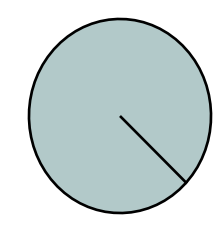
- circle help.png (7.82 KiB) Viewed 1433 times
Re: Circle Help
Hi.
Click the icon in the ellipse toolbar when you draw a circle.
http://tavmjong.free.fr/INKSCAPE/MANUAL/html/Shapes-Arcs.html
Click the
icon in the ellipse toolbar when you draw a circle.http://tavmjong.free.fr/INKSCAPE/MANUAL/html/Shapes-Arcs.html
Re: Circle Help
I'm sorry, I'm not sure I know where the icon in the ellipse toolbar is?
Re: Circle Help
oh...I found it. The toolbar is at top.
thank you
thank you