 This is a read-only archive of the inkscapeforum.com site. You can search for info here or post new questions and comments at
 trouble converting bmp
trouble converting bmp
I am having trouble converting a particular jpg file so it can be stencil cut and engraved in a piece of stone. The images seem to be in good quality but the text becomes unreadable. Any help would be appreciated...attached is the jpg file
- Attachments
-

- ECS logo.jpg (32.44 KiB) Viewed 2556 times

Re: trouble converting bmp

Welcome to InkscapeForum!
Mmmm....the biggest problem is the quality of the JPG. Do you have access to any better quality image? If that's all you have, it can probably be improved by someone who is skilled with raster graphics. And then it could be traced in Inkscape with better results. But it would be better if you had a better image.
One might guess that you're doing this for that school, or school district. As long as you're doing it with their blessing, I'm sure they could provide a nice image for you to start with. Having said that though, it seems like a lot of detail to be carved into stone. Although I guess the stone carver (for lack of the proper name) would know how to handle the detail. ....But now that I think about it, it seems like the stone carver would either know how to make the stencil, or have someone who can create the stencil. So perhaps you won't be able to get a better quality image.
I'm really not very good with raster graphics, and probably not the best one for the job. But if no one else volunteers in the next few days, I'll grab it and see what I can do.
Basics - Help menu > Tutorials
Manual - Inkscape: Guide to a Vector Drawing Program
Inkscape Community - Inkscape FAQ - Gallery
Inkscape for Cutting Design
Manual - Inkscape: Guide to a Vector Drawing Program
Inkscape Community - Inkscape FAQ - Gallery
Inkscape for Cutting Design
Re: trouble converting bmp
Quality is bad : bad scaling (nearest neighbour) + jpg compression ; this really doesn't help.
I try to clean it up for you anyway.
I used g'mic filters for gimp => enhacement / bilinear filtering (*2 times)) this removed most of jpg artifacts.
tracing using 3 colors you may be able to get some decent results.
I try to clean it up for you anyway.
I used g'mic filters for gimp => enhacement / bilinear filtering (*2 times)) this removed most of jpg artifacts.
tracing using 3 colors you may be able to get some decent results.
- Attachments
-

- ECS logo.png (115.06 KiB) Viewed 2531 times
Re: trouble converting bmp
I do see a little improvement, v1nce. But I'm afraid it won't be nearly enough for a good trace. I wonder if frademac blurred it slightly, if that might help smooth out the jagged lines? (Unless...could you perhaps have attached the original one by mistake?)
Basics - Help menu > Tutorials
Manual - Inkscape: Guide to a Vector Drawing Program
Inkscape Community - Inkscape FAQ - Gallery
Inkscape for Cutting Design
Manual - Inkscape: Guide to a Vector Drawing Program
Inkscape Community - Inkscape FAQ - Gallery
Inkscape for Cutting Design
Re: trouble converting bmp
brynn wrote:Unless...could you perhaps have attached the original one by mistake?
No I didn't.

Zoom at it with your favorite bitmap editor and you'll see the pixel soup (around the school text for exemple) is gone.
(for me) there's a clear enhancement.
The problem is : this enhancement doesn't help that much (if at all) for tracing because (hidden stages of) tracing will do more or less the same operations I did with the external tool.
The quality of the input source is so low it will be near impossible to do a good trace. Some "data" are missing : look at the "C" of school it has no top line.
It would be faster to trace the eagle and to remake the seal by hand IMHO
- Attachments
-
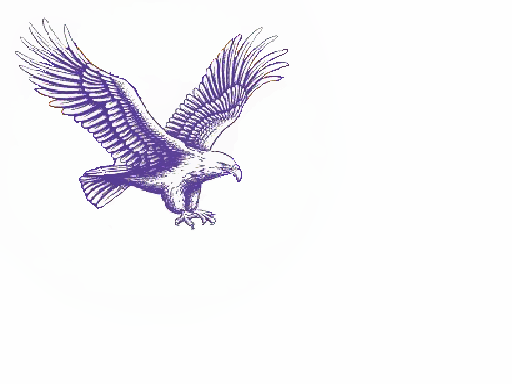
- eagle.png (58.44 KiB) Viewed 2462 times

Re: trouble converting bmp

- eaton eagles2.png (194.69 KiB) Viewed 2419 times
It's just that good. (<-- not as good as 'draw freely' but kind of catchy, yes?

Get the SVGZ here.
Your mind is what you think it is.
Re: trouble converting bmp
How did you get the text back ? Preprocessing the bitmap ? Tweaking the potrace options ?
Re: trouble converting bmp
there was a lot of GIMP preprocessing. Wavelet decomposition and sharpening/blurring certain layers allows considerable modification. Color to alpha was used, and in the end I exported a monochrome to scan in inkscape. Not perfect - look at the yellow running into the wing - but still it was a nice challenge. # of nodes is quite high... As you said, better to whatthefont the text and just retype it later.
Your mind is what you think it is.
Re: trouble converting bmp
> there was a lot of GIMP preprocessing
Phew ! I think I missed this autoenhancement filter somewhere in gimp or inkscape. (You know the one they're using all the time in CSI)
Did you use filters only ? You manage to revive the text using wavelet ?
I end up redrawing some character that were too thin (N in community for exemple).
What did you use for source ? Original image or mine ?
> # of nodes is quite high
Strange your output looks very clean.
Phew ! I think I missed this autoenhancement filter somewhere in gimp or inkscape. (You know the one they're using all the time in CSI)
Did you use filters only ? You manage to revive the text using wavelet ?
I end up redrawing some character that were too thin (N in community for exemple).
What did you use for source ? Original image or mine ?
> # of nodes is quite high
Strange your output looks very clean.
Re: trouble converting bmp
v1nce wrote:Did you use filters only ? You manage to revive the text using wavelet ?
I end up redrawing some character that were too thin (N in community for exemple).
I think i used stroke selection once to beef up an outline...
i used the original because the letters were just a bit better...
v1nce wrote: # of nodes is quite high...
Strange your output looks very clean
High is relative I suppose!
I could have cleaned it up more by selectively deleting nodes esp in the text but that would have been too much effort for a nonpaying project!Your mind is what you think it is.
Re: trouble converting bmp
Impressive work druban! 
(You're very lucky, frademac )
)
(You're very lucky, frademac
)Basics - Help menu > Tutorials
Manual - Inkscape: Guide to a Vector Drawing Program
Inkscape Community - Inkscape FAQ - Gallery
Inkscape for Cutting Design
Manual - Inkscape: Guide to a Vector Drawing Program
Inkscape Community - Inkscape FAQ - Gallery
Inkscape for Cutting Design