 This is a read-only archive of the inkscapeforum.com site. You can search for info here or post new questions and comments at
 HI
I'm trying to place circles along a spiral path.
I have been successful with placing circles around a circular path, but when I do so with a spiral path, the spiral seems to land on top of the circle in a very deformed way. Am I doing something backwards or is it simply not possible.
thanks
david
objects around a spial path
-
tylerdurden
- Posts: 2344
- Joined: Sun Apr 14, 2013 12:04 pm
- Location: Michigan, USA
Re: objects around a spial path
Maybe...?
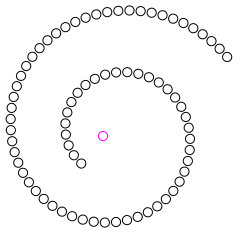
http://tavmjong.free.fr/INKSCAPE/MANUAL ... nAlongPath
Or, if not what you're looking for, please elaborate.
http://tavmjong.free.fr/INKSCAPE/MANUAL ... nAlongPath
Or, if not what you're looking for, please elaborate.
Have a nice day.
I'm using Inkscape 0.92.2 (5c3e80d, 2017-08-06), 64 bit win8.1
The Inkscape manual has lots of helpful info! http://tavmjong.free.fr/INKSCAPE/MANUAL/html/
I'm using Inkscape 0.92.2 (5c3e80d, 2017-08-06), 64 bit win8.1
The Inkscape manual has lots of helpful info! http://tavmjong.free.fr/INKSCAPE/MANUAL/html/
Re: objects around a spial path
...or perhaps even:
Select the circle and press Home before the extension.
Another way for spirals:
http://tavmjong.free.fr/INKSCAPE/MANUAL/html/Tiles-Tricks.html
The pattern is the top most object in the selection.
Select the circle and press Home before the extension.
Another way for spirals:
http://tavmjong.free.fr/INKSCAPE/MANUAL/html/Tiles-Tricks.html
Re: objects around a spial path
HI
Thank you Tylerdurden, Lazar and Microugly (can I just call you ugly )
)
You are all cool and right.
the winner for me is:
" The pattern is the top most object in the selection."
I know it was a dumb question but it is about the third thing I have ever done on Inkscape.
regards to all.
Thank you Tylerdurden, Lazar and Microugly (can I just call you ugly
) You are all cool and right.
the winner for me is:
" The pattern is the top most object in the selection."
I know it was a dumb question but it is about the third thing I have ever done on Inkscape.
regards to all.