 This is a read-only archive of the inkscapeforum.com site. You can search for info here or post new questions and comments at
 I do not know how to explain what's happening or not happening, so I posted a link to a 2min tutorial on Youtube which shows the correct way and the only way I have found to make a frame in Inkscape. I then posted a video link of whats happening when I try to follow the tutorial. The line become inverted, appreciated if someone that give me some advice.
Youtube Inkscape Tutorial....
http://www.youtube.com/watch?v=9LyR0C1oR_E&list=PLBBF6CFFE05DB041B&index=5
Desktop / Quicktime video, making mistakes using Inkscape.....
https://dl.dropboxusercontent.com/u/46928685/Inkscape.mov
Frame not working ( Mac )

Re: Frame not working ( Mac )
Hi.
Do not use the mouse to move the nodes but the < or > keys only.
Good Luck
RGDS
Ragnar
Do not use the mouse to move the nodes but the < or > keys only.
Good Luck
RGDS
Ragnar
Good Luck!
( ͡° ͜ʖ ͡°)
RGDS
Ragnar
( ͡° ͜ʖ ͡°)
RGDS
Ragnar
-
InkscapePlatz
- Posts: 3
- Joined: Sun May 05, 2013 12:09 pm
Re: Frame not working ( Mac )
In my video I have the "Key strokes" turned on while taping. It is there where you can see that I did not use the mouse, but in fact used the < > and then tried
shift < >
shift < >
Re: Frame not working ( Mac )
There's a difference between the < > keys and the arrow (cursor movement) keys (←→):
See also: Inkscape keyboard and mouse reference: Scale nodes (>1 nodes selected) [*]
-----
[*] Additional tip for Mac users (wrt scaling steps of 1 screen pixel using 'Option/Alt' modifier): don't forget to adjust the preferences of X11 to have 'Alt' working in Inkscape, as described e.g. in the Inkscape FAQ > Mac OS X specific issues > How can I make the Alt key work?
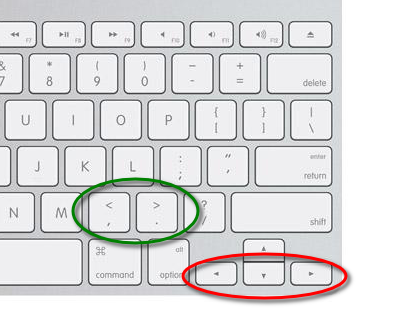
- scale-nodes-keyboard-shortcuts-1.png (87.38 KiB) Viewed 644 times
See also: Inkscape keyboard and mouse reference: Scale nodes (>1 nodes selected) [*]
-----
[*] Additional tip for Mac users (wrt scaling steps of 1 screen pixel using 'Option/Alt' modifier): don't forget to adjust the preferences of X11 to have 'Alt' working in Inkscape, as described e.g. in the Inkscape FAQ > Mac OS X specific issues > How can I make the Alt key work?
-
InkscapePlatz
- Posts: 3
- Joined: Sun May 05, 2013 12:09 pm
Re: Frame not working ( Mac )
~suv wrote:There's a difference between the < > keys and the arrow (cursor movement) keys (←→):
See also: Inkscape keyboard and mouse reference: Scale nodes (>1 nodes selected) [*]
-----
[*] Additional tip for Mac users (wrt scaling steps of 1 screen pixel using 'Option/Alt' modifier): don't forget to adjust the preferences of X11 to have 'Alt' working in Inkscape, as described e.g. in the Inkscape FAQ > Mac OS X specific issues > How can I make the Alt key work?
Because I'm so dense, I did not pickup on Ragnar's description, for that I apologize. However, "SUV" I can't thank you enough for your clarification via screenshot.
It now works beautifully
