Can someone advise me on how to make a calligraphic curve? I've tried the few suggestions that I've found online and none of them seem amenable to a curve that goes back on itself like this.
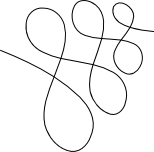
This is a PNG of the swirl I'm trying to make calligraphic.
Below is a link the SVG of the swirl I'm trying to make calligraphic.
http://www.mediafire.com/?trehwjduuostvbu
Thanks for reading!
Attempting calligraphy along a path
-
seans_potato_biz
- Posts: 138
- Joined: Mon Apr 07, 2008 6:01 am
Attempting calligraphy along a path
Win 7/10, Inkscape 0.92.2
We don't inherit the Earth from our parents; we borrow it from our children.
Re: Attempting calligraphy along a path
Have you tried Calligraphy tool?
Re: Attempting calligraphy along a path
That svg shows a filled path, and not a single stroke.
If you want a calligraphy, you "wouldn't need anything else". As it is now like an already calligraphed path, with a rounded pen nib.
After you have a core path for the calligraphy, it is a question how you want your pen to be controlled.
I'm having an idea how to set parameters of the pen shape along the path in a live way, but there is no such thing available yet to my knowledge.
So what you can do:
Use the calligraphy tool's hatchings option
http://tavmjong.free.fr/INKSCAPE/MANUAL/html/Paths-Creating.html#Paths-Calligraphy
With that, you can use a particular pen shape -a simple flat nib- with most ability for it to be rotated/scaled.
However calligraphy is a more geometry based than that mostly.
You can use the scatter extension to create a rough approximation how your calligraphed stroke would look
with any shape in the same angle or in the orientation of the path.
http://tavmjong.free.fr/INKSCAPE/MANUAL/html/Extensions-GenerateFromPath.html#Extensions-Scatter
Similar to that, is the pattern along path extension, but that is not making a calligraphically correct stroke.
-It distorts the pen shape.-
http://tavmjong.free.fr/INKSCAPE/MANUAL.html"viewtopicd02c-2.html?f=5&t=13742#p53285" class="postlink">http://www.inkscapeforum.com/viewtopic.php?f=5&t=13742#p53285
http://tavmjong.free.fr/INKSCAPE/MANUAL/html/Paths-LivePathEffects-BendTool.html
The closest for creating a calligraphed stroke -to move a custom pen shape along a path-
is inside gimp.
Maybe you can try that too, and vectorise the result.
If you want a calligraphy, you "wouldn't need anything else". As it is now like an already calligraphed path, with a rounded pen nib.
After you have a core path for the calligraphy, it is a question how you want your pen to be controlled.
I'm having an idea how to set parameters of the pen shape along the path in a live way, but there is no such thing available yet to my knowledge.
So what you can do:
Use the calligraphy tool's hatchings option
http://tavmjong.free.fr/INKSCAPE/MANUAL/html/Paths-Creating.html#Paths-Calligraphy
With that, you can use a particular pen shape -a simple flat nib- with most ability for it to be rotated/scaled.
However calligraphy is a more geometry based than that mostly.
You can use the scatter extension to create a rough approximation how your calligraphed stroke would look
with any shape in the same angle or in the orientation of the path.
http://tavmjong.free.fr/INKSCAPE/MANUAL/html/Extensions-GenerateFromPath.html#Extensions-Scatter
Similar to that, is the pattern along path extension, but that is not making a calligraphically correct stroke.
-It distorts the pen shape.-
http://tavmjong.free.fr/INKSCAPE/MANUAL.html"viewtopicd02c-2.html?f=5&t=13742#p53285" class="postlink">http://www.inkscapeforum.com/viewtopic.php?f=5&t=13742#p53285
http://tavmjong.free.fr/INKSCAPE/MANUAL/html/Paths-LivePathEffects-BendTool.html
The closest for creating a calligraphed stroke -to move a custom pen shape along a path-
is inside gimp.
Maybe you can try that too, and vectorise the result.
Re: Attempting calligraphy along a path
Related post:
http://www.inkscapeforum.com/viewtopic.php?f=22&t=16546#p61164
Also if you are on a mac you may try robofont.
http://doc.robofont.com/
http://vimeo.com/49797030
http://www.inkscapeforum.com/viewtopic.php?f=22&t=16546#p61164
Also if you are on a mac you may try robofont.
http://doc.robofont.com/
http://vimeo.com/49797030