 This is a read-only archive of the inkscapeforum.com site. You can search for info here or post new questions and comments at
 Hello, I don't know about that, but i would like if you can help me, I want to do something similiar http://www.foro3d.com/tutoriales/inksca ... le_009.jpg
Somebody know about that, I need a tutorial please
Help me Please with deform metod
Re: Help me Please with deform metod
Hello there!
Interesting theme.
Don't know how it was constructed, maybe based on intuition as it is inaccurate in many places for a sphere.
If I was to draw something similar, I would use blender.
I could help you with an accurate 3D based work, but nothing on how it could be mimmicked by a fast sketch.
Interesting theme.
Don't know how it was constructed, maybe based on intuition as it is inaccurate in many places for a sphere.
If I was to draw something similar, I would use blender.
I could help you with an accurate 3D based work, but nothing on how it could be mimmicked by a fast sketch.
Re: Help me Please with deform metod
Hello
I think that a similar topic was treated before in this forum, but I don't know how to find it.
umm
I think that a similar topic was treated before in this forum, but I don't know how to find it.
umm
If you have problems:
1.- Post a sample (or samples) of your file please.
2.- Please check here:
http://tavmjong.free.fr/INKSCAPE/MANUAL/html/index.html
3.- If you manage to solve your problem, please post here your solution.
1.- Post a sample (or samples) of your file please.
2.- Please check here:
http://tavmjong.free.fr/INKSCAPE/MANUAL/html/index.html
3.- If you manage to solve your problem, please post here your solution.


Re: Help me Please with deform metod
hulf2012 wrote:Hello
I think that a similar topic was treated before in this forum, but I don't know how to find it.
umm
I remember when I first started out doing CG this was one of the first things I wanted to do! KPT if anyone even remembers that plugin for PS...Anyway it's quite different in vector. Here's thelink to the topic in this forum so we don't repeat ourselves too much but perhaps Lazur can extend the discussion a bit...
The method I describe is a very fast way to do it but as with all such the most effective use is to do the procedure and then spend some time node editing until the curves look right. There are many ways to divide the surface of a sphere into polygons, and the method in Inkscape is only one.
Your mind is what you think it is.
Re: Help me Please with deform metod
Hmm didn't know about that spanish tutorial that this image came from,
nor that topic.
Will definitely look for how to set up blender for such scenery sometime.
nor that topic.
Will definitely look for how to set up blender for such scenery sometime.
Re: Help me Please with deform metod
Hello:
Ok, I tried the recipe, but added my own ingredients:

Greetings
Ok, I tried the recipe, but added my own ingredients:
Greetings
If you have problems:
1.- Post a sample (or samples) of your file please.
2.- Please check here:
http://tavmjong.free.fr/INKSCAPE/MANUAL/html/index.html
3.- If you manage to solve your problem, please post here your solution.
1.- Post a sample (or samples) of your file please.
2.- Please check here:
http://tavmjong.free.fr/INKSCAPE/MANUAL/html/index.html
3.- If you manage to solve your problem, please post here your solution.
Re: Help me Please with deform metod
Was thinking on the subject a bit.
Everyone is just drawing this geometrical based shape by intuition, but have no idea how this would be in 3D.
What is in my opinion should be the basic idea behind such images.
So looked up a Vasarely image for reference.
I chose this one:
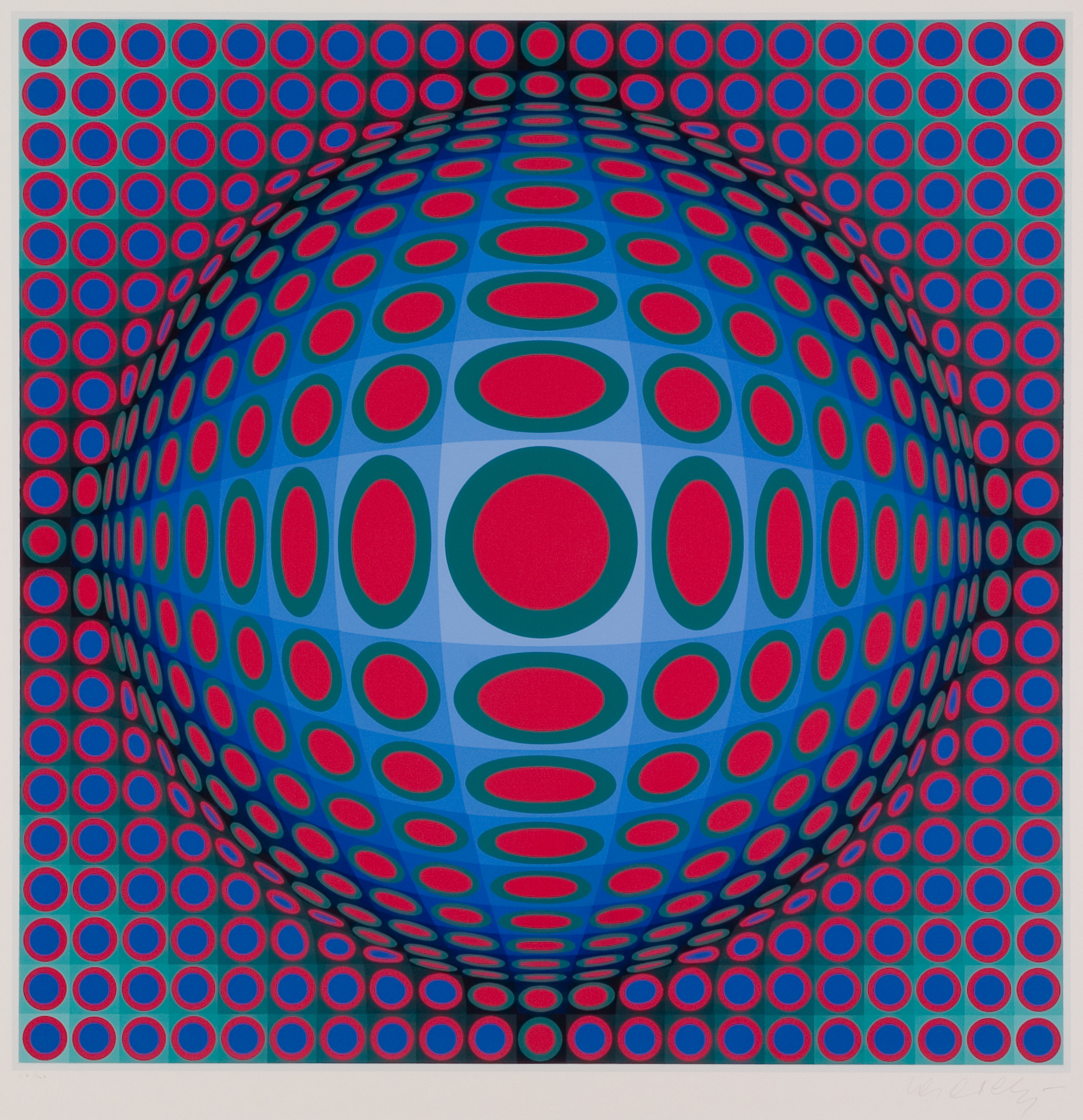
Knowing that even Vasarely didn't have an exact idea about a 3D representation, it is a bit try and error to reproduce one.
Some things I would start with:
1. The tile pattern is seamless,
which means there are no "hidden" parts involved.
This limits the 3D object's normals, which means in no way it can be more than a half shape.
2. The basic object is a sphere.
Not an obvious one, as many solid of revolution could be a good starting point as well, so that's just mine intuition.
3. The background is flat.
It isn't an obvious one as well, but for the logic, "things coming out from a flat painting" it is reasonable.
4. There is a transitional part that connects the flat background with the sphere on the front.
Practically I would go with a torus for that.
5. All the tile pattern is projected to that 3D model.
So there are 3 basic parts that can be variated:
The geometry,
the patern's projection,
the viewpoint's distance from the object.
The geometry part has the following parametres:
the sphere's origo's distance from the plane, the minor radius of the torus and the radius of the sphere.
The pattern's projection:
My idea is, that the horizontal lines go just as the vertical ones, so it's enough to construct just a vertical grid for the start.
The vertical lines go straight from the top to the transitional torus, where they are turning in a way, until they reach the sphere part, where
they all will go along on a circular part.
That is how I see it.
That means, the lines on the sphere can be fit to planes as well,
and those plane's relation to each can create a wide variety of clean results.
The viewpoint's distance of the object can result in a different look of the object and the texture,
most importantly it is related to the first point: if the viewpoint is too close to the sphere,
it becomes impossible to end up with a seamless pattern from the heavy distortion.
So to sum it up, there are many variants to handle at the same time, to create a 3D representation for that image accurately.
Maybe grasshopper or even povray would be the best to work on it.
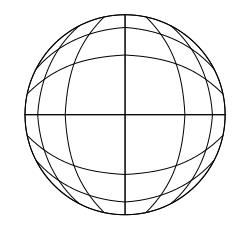
That post has a geometrically correct representation: a sphere with a basic wireframe, all ortographically projected.
There are two problems with that from that Vasarely's like shape: it cannot have a seamless tile pattern from the background, and,
that the horizontal and the vertical gridlines aren't shaped the same.
Everyone is just drawing this geometrical based shape by intuition, but have no idea how this would be in 3D.
What is in my opinion should be the basic idea behind such images.
So looked up a Vasarely image for reference.
I chose this one:
Knowing that even Vasarely didn't have an exact idea about a 3D representation, it is a bit try and error to reproduce one.
Some things I would start with:
1. The tile pattern is seamless,
which means there are no "hidden" parts involved.
This limits the 3D object's normals, which means in no way it can be more than a half shape.
2. The basic object is a sphere.
Not an obvious one, as many solid of revolution could be a good starting point as well, so that's just mine intuition.
3. The background is flat.
It isn't an obvious one as well, but for the logic, "things coming out from a flat painting" it is reasonable.
4. There is a transitional part that connects the flat background with the sphere on the front.
Practically I would go with a torus for that.
5. All the tile pattern is projected to that 3D model.
So there are 3 basic parts that can be variated:
The geometry,
the patern's projection,
the viewpoint's distance from the object.
The geometry part has the following parametres:
the sphere's origo's distance from the plane, the minor radius of the torus and the radius of the sphere.
The pattern's projection:
My idea is, that the horizontal lines go just as the vertical ones, so it's enough to construct just a vertical grid for the start.
The vertical lines go straight from the top to the transitional torus, where they are turning in a way, until they reach the sphere part, where
they all will go along on a circular part.
That is how I see it.
That means, the lines on the sphere can be fit to planes as well,
and those plane's relation to each can create a wide variety of clean results.
The viewpoint's distance of the object can result in a different look of the object and the texture,
most importantly it is related to the first point: if the viewpoint is too close to the sphere,
it becomes impossible to end up with a seamless pattern from the heavy distortion.
So to sum it up, there are many variants to handle at the same time, to create a 3D representation for that image accurately.
Maybe grasshopper or even povray would be the best to work on it.
That post has a geometrically correct representation: a sphere with a basic wireframe, all ortographically projected.
There are two problems with that from that Vasarely's like shape: it cannot have a seamless tile pattern from the background, and,
that the horizontal and the vertical gridlines aren't shaped the same.
Re: Help me Please with deform metod
The question of how to project a rectangular grid onto a sphere with minimal distortion is of course one that has been pondered long and hard and with only middling success by geographers everywhere. The Inaccuracies in the Vasarely shows how difficult it is - look at the center nine tiles to see how arbitrarily he has chosen to resolve the problem! The problem with trying to create a 3D model is that the original graphic cheats a little; the meridians don't go to the poles, so it is not possible to make a sphere whose divisions would look like this in any projection:
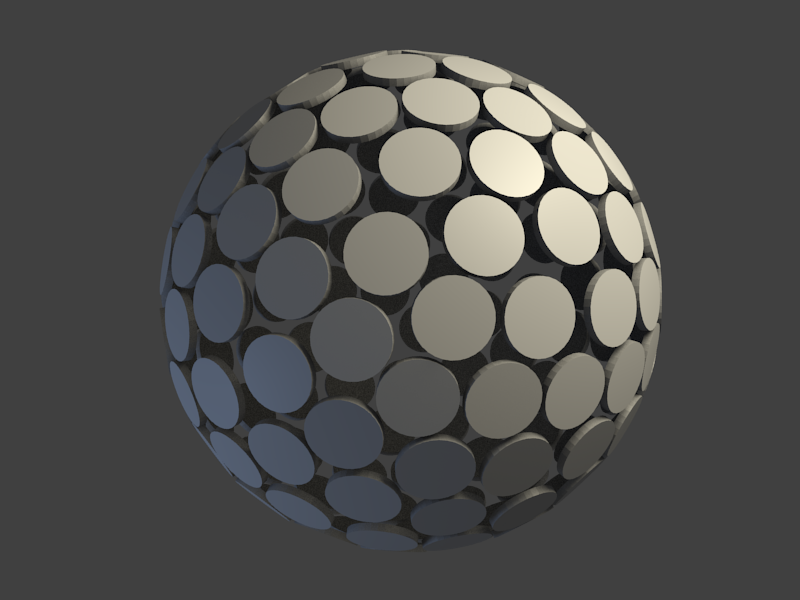
An icosahedral approach - quite different from the original, but just an idea for future readers of this thread...
- rect4672.png (20.21 KiB) Viewed 5465 times
An icosahedral approach - quite different from the original, but just an idea for future readers of this thread...
- spherediskflatsamples25.png (185.36 KiB) Viewed 5490 times
Your mind is what you think it is.