Vector Line not cutting correctly

Post questions on how to use or achieve an effect in Inkscape.
Lingy99
Posts: 2
Joined: Thu Jul 11, 2013 8:48 pm

Vector Line not cutting correctly

Postby Lingy99 » Thu Jul 11, 2013 9:28 pm

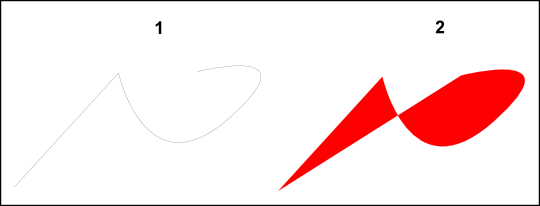
What I want to achieve: To cut a single line on my vinyl plotter where the first and last node have no joining cut line
Problem: When i send image '1' to the cutter it cuts image '2'

I right click after drawing my last node so the first and last node do not join and create an object.
When I give it a fill colour it looks like image '2' - (I have seen this in previously used graphic program but when I send it to the plotter it cuts image '1').
Image

If you can solve this I would be extremely grateful... I think the software is fantastic and would prefer to support open source!

hulf2012
Posts: 716
Joined: Sat Nov 24, 2012 12:37 pm

Re: Vector Line not cutting correctly

Postby hulf2012 » Fri Jul 12, 2013 7:59 am

Hello,
I would try this:
Shift + Ctrl + F to bring the fill and stroke dialog. In the stroke tab, change the wide of the stroke to 2 mm of 1/8 inch, i gesss.
Then Ctrl + Alt + C to convert the stroke in a closed path. After that, cut.
If you have problems:
1.- Post a sample (or samples) of your file please.
2.- Please check here:
http://tavmjong.free.fr/INKSCAPE/MANUAL/html/index.html
3.- If you manage to solve your problem, please post here your solution.

Lazur
Posts: 4717
Joined: Tue Jun 14, 2016 10:38 am

Re: Vector Line not cutting correctly

Postby Lazur » Fri Jul 12, 2013 8:13 am

I don't know much about vinyl cutters and softwares for them, but the problem seems outside inkscape to me so
the only approximate solution I could think of is creating a closed path from the original open path
-by adding a small stroke width at the fill and stroke panel, then turning the outline to stroke by pressing Ctrl+Alt+C.
This will result in a bit fatter cuts, and double time for the making,
but actually work if the cutter responds as you described.

Lingy99
Posts: 2
Joined: Thu Jul 11, 2013 8:48 pm

Re: Vector Line not cutting correctly

Postby Lingy99 » Sat Jul 13, 2013 2:10 am

Needs to be a single line cut... Double line or stroke will eventually shred on a complex image...

Lazur
Posts: 4717
Joined: Tue Jun 14, 2016 10:38 am

Re: Vector Line not cutting correctly

Postby Lazur » Sat Jul 13, 2013 8:15 am

I really don't know what could be done on the inkscape's end to solve this.
Reading this reply it seems that the issue of open paths is solved on never cutters (?).


Return to “Help with using Inkscape”