 This is a read-only archive of the inkscapeforum.com site. You can search for info here or post new questions and comments at
 i need help ... we recently followed this tutorial on making interlocking rings(the tutorial is originally for Adobe illustrator?.and now my profs wants un to do it in inkscape..anybody out there who can help me??pls..thank you very much
here's the tutorial i'm talking about..
http://veerle.duoh.com/design/article/c ... llustrator
HELP ME! INTERLOCKING RINGS

Re: HELP ME! INTERLOCKING RINGS
Hi.
Have a look at these:
http://www.google.com/url?sa=t&rct=j&q= ... 4169,d.b2I
http://cryosphinx.deviantart.com/art/Kn ... -157172738
Good Luck
RGDS
Ragnar
Have a look at these:
http://www.google.com/url?sa=t&rct=j&q= ... 4169,d.b2I
http://cryosphinx.deviantart.com/art/Kn ... -157172738
Good Luck
RGDS
Ragnar
Good Luck!
( ͡° ͜ʖ ͡°)
RGDS
Ragnar
( ͡° ͜ʖ ͡°)
RGDS
Ragnar

Re: HELP ME! INTERLOCKING RINGS

Welcome to InkscapeForum!
Do you mean that you want a tutorial written for Inkscape? Or do you just want to draw it with Inkscape?
It's a nice design, and I wouldn't mind writing up a tutorial. But it would take me a while....maybe a week or 2 for something nice. (Well, if I had the time, I could finish in less than a day. But it's a busy time of year
 ) But it really could be done with pretty basic Inkscape skills, if you just need to draw it. If you look at the Help menu > Tutorials, I would suggest reading (and practicing) the Basic, Shapes and Advanced tutorials, and you'll have all the skills you need (plus some that you don't need for this drawing). Even the one titled Advanced teaches fairly basic skills.
Let me know if you want a tutorial written, and I'll put it on the "To Do" list
Oops, hi Ragnar
After suggesting that cleverkeith03 look at the tutorials in Help menu, I noticed some tutorials that I had not noticed before. So I started to look through them, and forgot to post my message, lol. I might mention, for cleverkeith03, that the tutorials you suggested would not be what I would call basic skills. But they certainly are tutorials that are already written! (I would probably use path operations, in various combinations.)Basics - Help menu > Tutorials
Manual - Inkscape: Guide to a Vector Drawing Program
Inkscape Community - Inkscape FAQ - Gallery
Inkscape for Cutting Design
Manual - Inkscape: Guide to a Vector Drawing Program
Inkscape Community - Inkscape FAQ - Gallery
Inkscape for Cutting Design

Re: HELP ME! INTERLOCKING RINGS
The only thing that Illustrator does in this tutorial that Inkscape can't do at this point is the multiple divide boolean operation. In Inkscape the divide operation only takes 2 paths at a time so it's going to be slow going at that point...
But if you can't copy the tutorial there's no reason not to be smarter and impress your prof!
Note that there are only TWO shapes that we are dealing with. A 120° arc and a 240° arc. (They are actually slightly less but it's a better idea to simulate that with the white stroke. If you use clones as suggested below you can arrange everything and then edit the original's arcs slightly)
Use the ellipse tool to make these by entering the appropriate numbers in the control bar. Then convert to path, stroke to path, give them a white stroke* (see note below), duplicate them umpteen times: those two shapes are rotated to a few different angles and recolored to make the final complicated illustration!
A dotted circle is grouped with each colored arc in order to rotate the arc around its 'center' while keeping it aligned - easier to understand by doing than to explain (I think)
But if you can't copy the tutorial there's no reason not to be smarter and impress your prof!
Note that there are only TWO shapes that we are dealing with. A 120° arc and a 240° arc. (They are actually slightly less but it's a better idea to simulate that with the white stroke. If you use clones as suggested below you can arrange everything and then edit the original's arcs slightly)
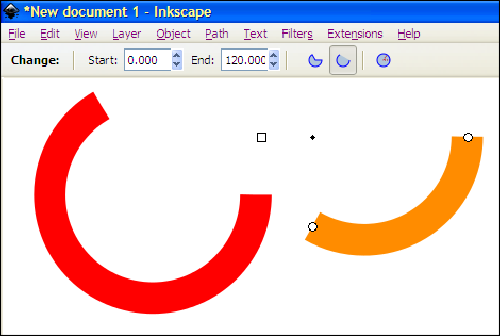
- rect4079.png (25.85 KiB) Viewed 2531 times
Use the ellipse tool to make these by entering the appropriate numbers in the control bar. Then convert to path, stroke to path, give them a white stroke* (see note below), duplicate them umpteen times: those two shapes are rotated to a few different angles and recolored to make the final complicated illustration!

- rect4131.png (42.43 KiB) Viewed 2526 times
A dotted circle is grouped with each colored arc in order to rotate the arc around its 'center' while keeping it aligned - easier to understand by doing than to explain
(I think)Off topic:
*If you are proficient with clones it would a better method to unset stroke and then clone twice, set the stroke of the top clone to a color and the bottom clone's (wider) stroke to white. Then you can adjust the length of ALL the arcs by adjusting the original. This would be a good time to learn how to use clones to make your drawing more efficient!Your mind is what you think it is.
-
cleverkeith03
- Posts: 3
- Joined: Sun Dec 23, 2012 6:29 am
Re: HELP ME! INTERLOCKING RINGS
thanks for some tips .. i hope i can make it..
@brynn..can i ask you a lil favor??i somehow manage to follow the tips of druban..but still can't make it..can you have a simple tutorial for this in inkscape..you see im a beginner here..thankks.
@brynn..can i ask you a lil favor??i somehow manage to follow the tips of druban..but still can't make it..can you have a simple tutorial for this in inkscape..you see im a beginner here..thankks.
Re: HELP ME! INTERLOCKING RINGS
Actually, I think Ragnar is onto something, with the Knots LPE. I'll start working on a tutorial, but in the last few days, some things have come up. So it will take at least 2 weeks. I'll make it a formal tutorial, which may well be the first on my new website!
Basics - Help menu > Tutorials
Manual - Inkscape: Guide to a Vector Drawing Program
Inkscape Community - Inkscape FAQ - Gallery
Inkscape for Cutting Design
Manual - Inkscape: Guide to a Vector Drawing Program
Inkscape Community - Inkscape FAQ - Gallery
Inkscape for Cutting Design
Re: HELP ME! INTERLOCKING RINGS
cleverkeith03 wrote:i somehow manage to follow the tips of druban..but still can't make it..
You didn't say at what point you had problems. anyway here's a step by step for two different methods. Although you did say you were a beginner the project you have been assigned is not what i might call a beginner project... I'm afraid there is no 'beginner' method to do an 'intermediate' project. Sorry!
BTW I didn't use the Knot LPE because - well, just because.

Good luck!
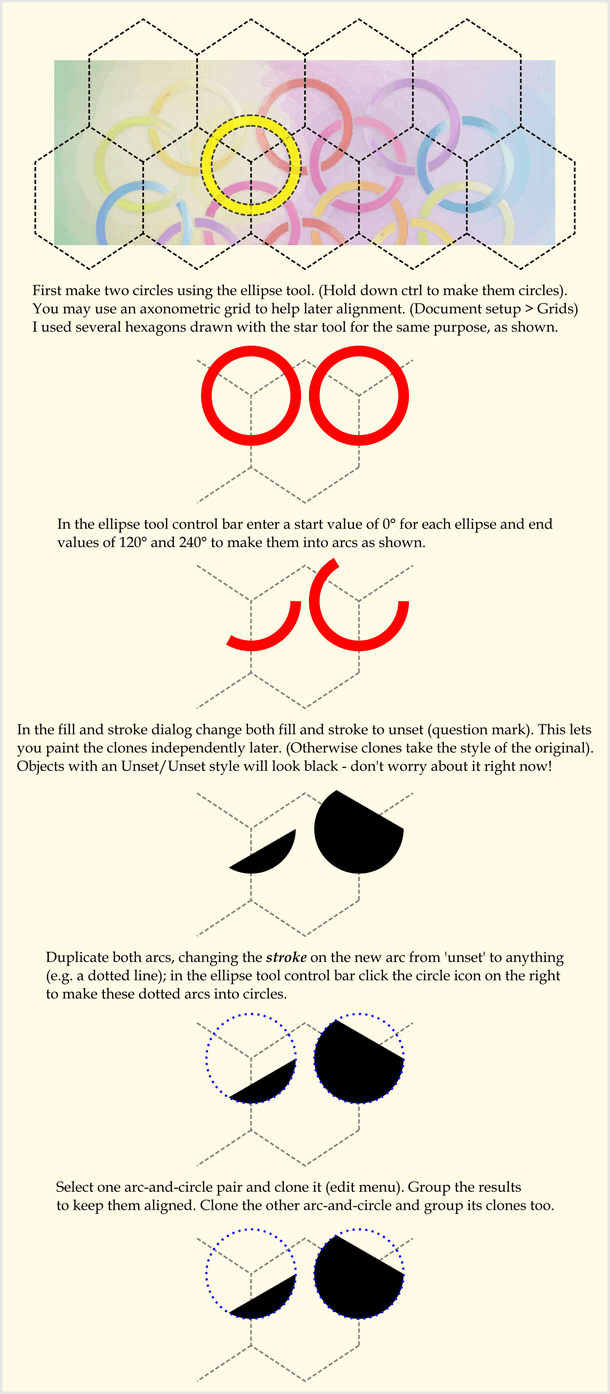
- rect514.png (115.8 KiB) Viewed 2411 times
Continued in next post!
Last edited by druban on Sun Dec 30, 2012 5:13 pm, edited 3 times in total.
Your mind is what you think it is.
Re: HELP ME! INTERLOCKING RINGS
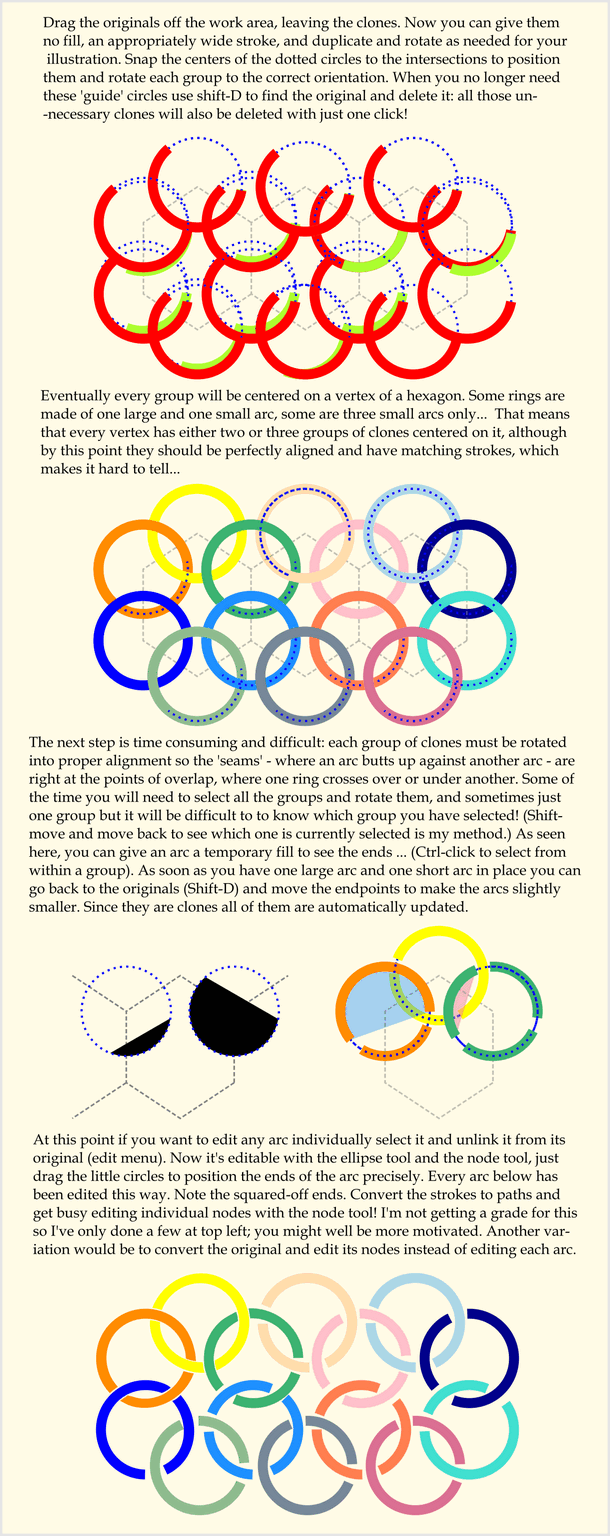
- rect5892.png (170.52 KiB) Viewed 2410 times
There's one more part!
Last edited by druban on Sun Dec 30, 2012 5:17 pm, edited 3 times in total.
Your mind is what you think it is.
Re: HELP ME! INTERLOCKING RINGS
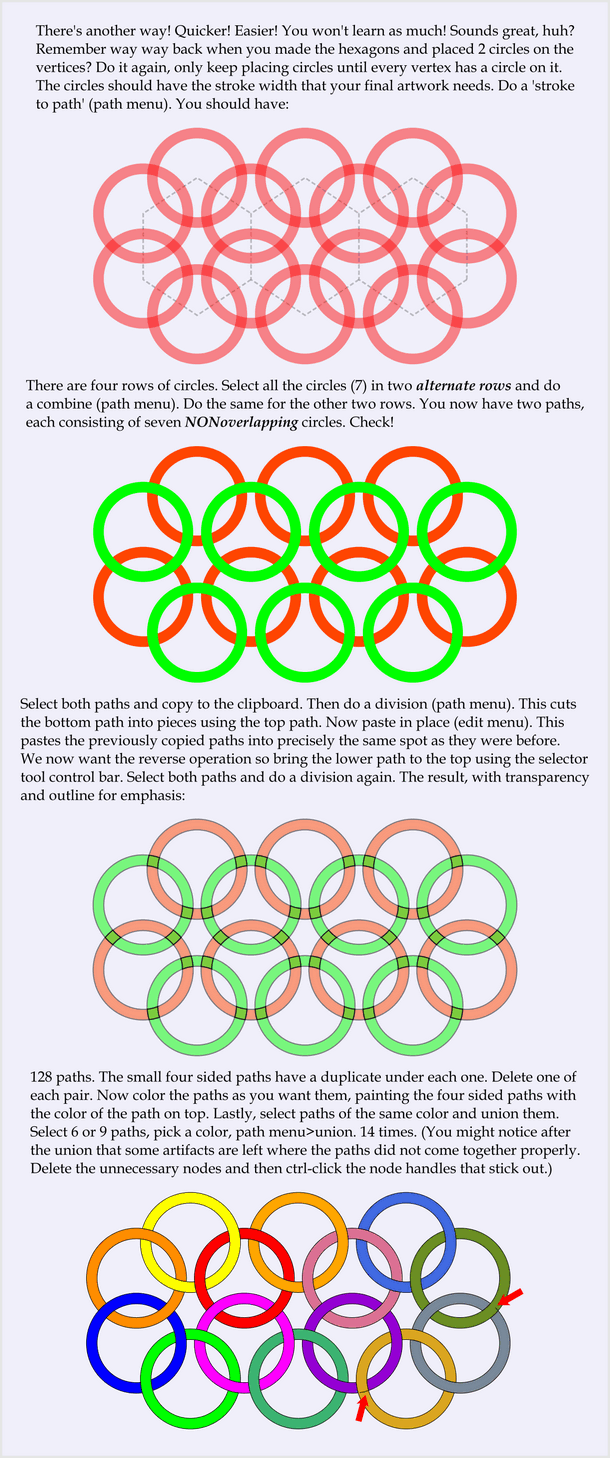
- rect5890.png (164.7 KiB) Viewed 2410 times

Your mind is what you think it is.
-
cleverkeith03
- Posts: 3
- Joined: Sun Dec 23, 2012 6:29 am
Re: HELP ME! INTERLOCKING RINGS
thank you very much ...i'll try all of that..